Share on social
Oct 14, 2026
Lorem ipsum
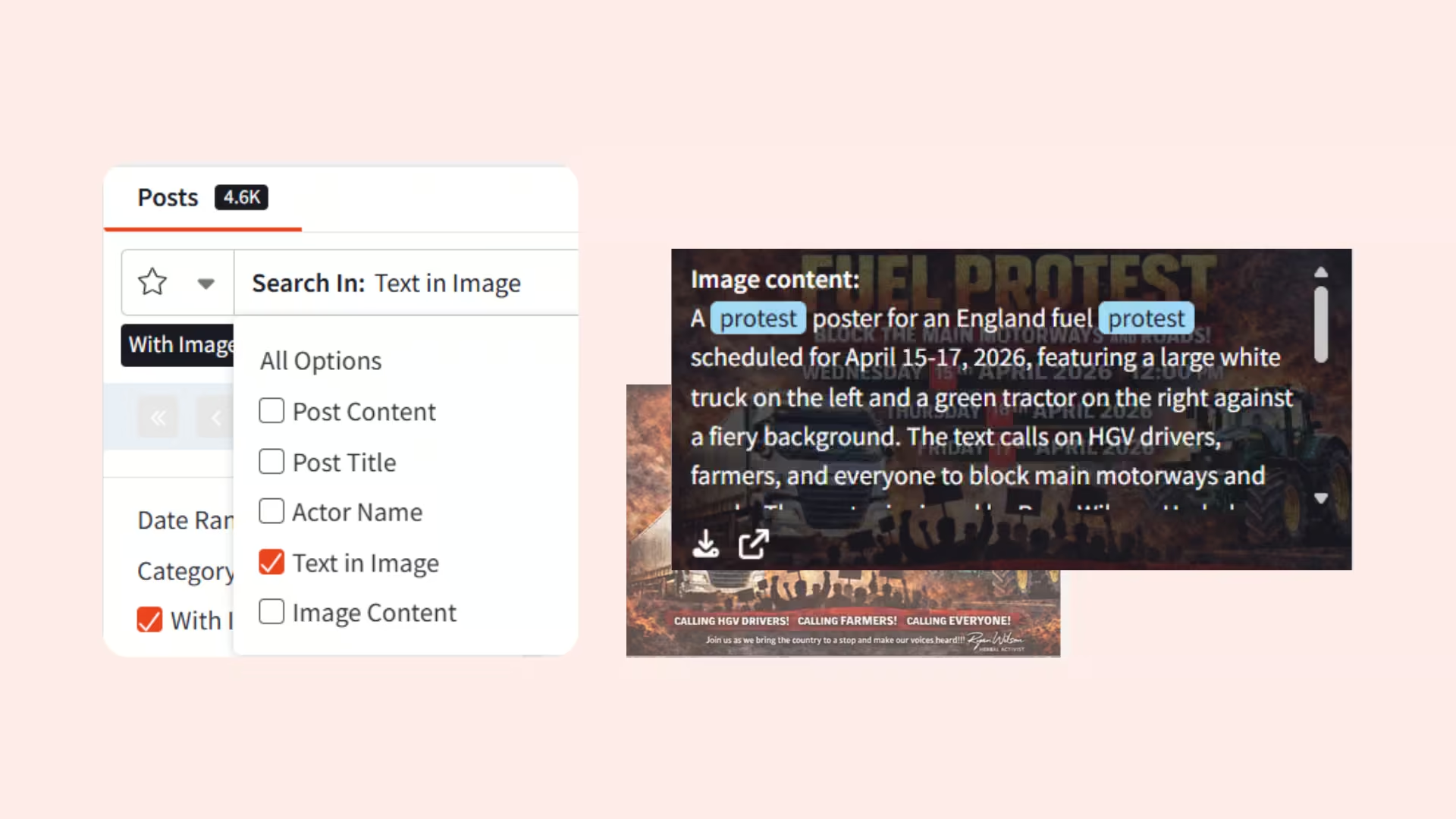
Investigation teams can now search and view results containing images across all Searchlight’s clear, deep, and dark web collections – surfacing results often missed by text-only search. Whether you are an Enterprise protecting your brand or Law Enforcement tracking the sale of illicit goods, this release significantly expands your investigative reach.
What’s new
This release makes image search and Optical Character Recognition (OCR) available to all Searchlight Investigate users – making it easier to discover listings featuring your brand name or selling illicit goods, even when they weren't previously searchable by keyword alone.
- Image Search Dashboard: Search by keyword and filter by criteria relevant to your investigation.
- Optical Character Recognition (OCR): Automatically convert text from images into searchable text.
- Image content captions: Automatic description text describing the content of an image
- Hash Image Search: Search for the ‘fingerprint’ of the photo using the MD5, SHA-1, or SHA-256 hash value
Key benefits for Criminal Investigation teams
This feature, previously limited to a small selection of law enforcement teams, is now available to all criminal investigators and can be used to facilitate the discovery of the sale of illicit goods, including arms and narcotics, that previously would not have been surfaced where the keyword didn’t appear in the post’s title or description. An example would be a listing of a gun for sale. OCR will now extract the model name or serial number, while Image Captioning automatically describes what’s shown.
This release also accelerates the discovery of illegal recruitment posters shared in forums to advertise for human trafficking or extremism.

Key benefits for CTI teams
Enterprise CTI teams can strengthen their incident investigation and Digital Risk Protection (DRP) through the use of the new image search. This release enables them to zero in on instances of fraud, identity theft, and forgery schemes against their brand. An example where this feature is invaluable, is with the identification of gift card fraud or the resale of user access credentials that were previously difficult to surface when shared within screenshots.
Additionally, this supports their ability to identify cases where their company name or logo may appear on posters or placards – such as those in protest posts that may be inciting violence or coordinated action against an organization or its personnel.

How it works
Users can use the Image Search Dashboard to search images by Name, URL, Hash, and the text within an image or its automatically generated caption. Results can also be sorted by date or relevance and filtered by image specific criteria, such as file type, size, or dimension. Each card on the dashboard includes a snapshot of the image to support investigations, including the date the image was posted and links and count of the forums where it is being shared.
The Forum Search will also now automatically return results where a keyword was found in an image or its automatically generated caption.