Share on social
October 12, 2026
Lorem ipsum
Table of Contents
There was some research that the PortSwigger team released in late September that revealed that they were able to reach 100k requests per second over WiFi using HTTP/3. This caught my attention as a hacker that has always tried to find speed with fuzzing attempts. The context of the blog post stuck to how this worked with Turbo Intruder inside Burp Suite, and how it could be used to perform time of check time of use (TOCTOU) attacks.
While TOCTOU attacks are a use case that fuzzing can help with, most of my time as an attacker usually goes into discovery efforts rather than a specific attack. The fact that the PortSwigger team was able to reach 100k requests per second in Turbo Intruder really caught my attention as I felt that this same technology could be used towards fuzzing for discovery efforts instead (bruteforcing files and folders on webservers).
Being inspired from their research, I went ahead and forked the ffuf project and started implementing their HTTP/3 strategy from Turbo Intruder inside ffuf. There were a few key things that had to be implemented:
- Determining whether or not the web server supported HTTP/3.
- Automatic
HEADorRangerequests to limit the bandwidth and disruption on the server. - Fallback to older protocols when HTTP/3 was not supported.
While Turbo Intruder is a treasured feature of Burp Suite, I wanted to achieve the speed described in their blog post with open tooling that is commonly used for discovery efforts when performing blackbox testing.
What I ultimately found at the end of this project was that while the theory of reaching 100k requests per second is viable, in practice, it's quite rare to find web servers that can comfortably handle 100k requests per second, let alone web servers that even have HTTP/3 configured in a way to support this request load.
Before I even started work on this project, I looked into how widely supported HTTP/3 is, and to be honest, it looked quite promising:
From: https://en.wikipedia.org/wiki/HTTP/3
On 7 June 2021, LiteSpeed Web Server (and OpenLiteSpeed) 6.0.2 was released and became the first version to enable HTTP/3 by default.
Caddy web server v2.6.0 (released 20 September 2022) has HTTP/3 enabled by default.
nginx supports HTTP/3 since 1.25.0 (released 23 May 2023). A technology preview of nginx with HTTP/3 support was released in June 2020. Binary packages of nginx with HTTP/3 support have been released in February 2023.
Cloudflare distributes a patch for nginx that integrates the quiche HTTP/3 library into it.
Microsoft IIS support for HTTP/3 is enabled natively with Windows Server 2022/Windows 11.
HAProxy supports HTTP/3 over QUIC since version 2.6 released on 31 May 2022.
Nimble Streamer supports HTTP/3 since 4.1.8-1 for HTTP-based protocols.
Reading through the above, you might think that it's a widely supported feature, but it's only when you start digging through the details that you start to understand that HTTP/3 is not enabled by default but has to be opted into for pretty much every web server implementation of it.
For example, Nginx requires you to define a UDP listener for the QUIC protocol to support HTTP/3 explicitly. IIS requires you to set a specific registry key for it to actually be enabled. Apache doesn't even support HTTP/3 and has no plans to as it would involve a huge rewrite. The dream of performing 100k requests per second for discovery efforts quickly dies out in practice when facing the reality of how poorly supported it is in down stream servers.
Even moving past all of these blockers to seeing 100k requests per second for discovery efforts being possible, can servers even handle 100k requests per second without being DoS'd off the planet? To be honest, not really. You're either being blocked by a WAF, or you're ultimately DoS'ing the underlying server.
From my testing, there are some edge cases where 100k requests per second was achieved without leading to a DoS while still being useful, and that's mostly been infrastructure on Google Cloud CDNs.
All of this gives a really narrow scope for where this capability is actually worthwhile from an offensive security perspective, whether it's TOCTOU attacks, or discovery related fuzzing.
Despite all of this, we took some time in the last week to fix the things that annoy us the most about manual fuzzing for discovery efforts in our fork of ffuf. The project we are releasing today has been built on the ffuf engine with a huge amount of respect for Joona Hoikkala and the ffuf team, as well as a huge amount of respect to the PortSwigger team for their work on supporting HTTP/3 in Turbo Intruder.
We're releasing h3fuzz, which includes an interactive web UI on top of ffuf's engine, as well as implements PortSwigger's HTTP/3 research (instead using quic-go instead of kwik). The work was implemented with GPT 5.6 Sol Ultra, with frequent check ins, bug fixes after thorough testing and QA. To achieve 100k requests per second, we used a local harness, looping until 120k requests per second was achieved. There is documentation in the docs/ folder inside the repo with how this benchmark worked and how it was achieved by GPT.
The biggest wins from this project aren't really from the fact that we can support HTTP/3, but rather the quality of life improvements we gain after adding a web UI to ffuf.
Whenever I am performing content discovery, it often fits within a preset that I have shell aliases for (different ffuf commands depending on the backend I know I am bruteforcing). Depending on the backend, it sets different extensions that replace the %EXT% inside the wordlist being used (Dirsearch compatibility mode). This is really trivial in the target setup wizard in the web UI:
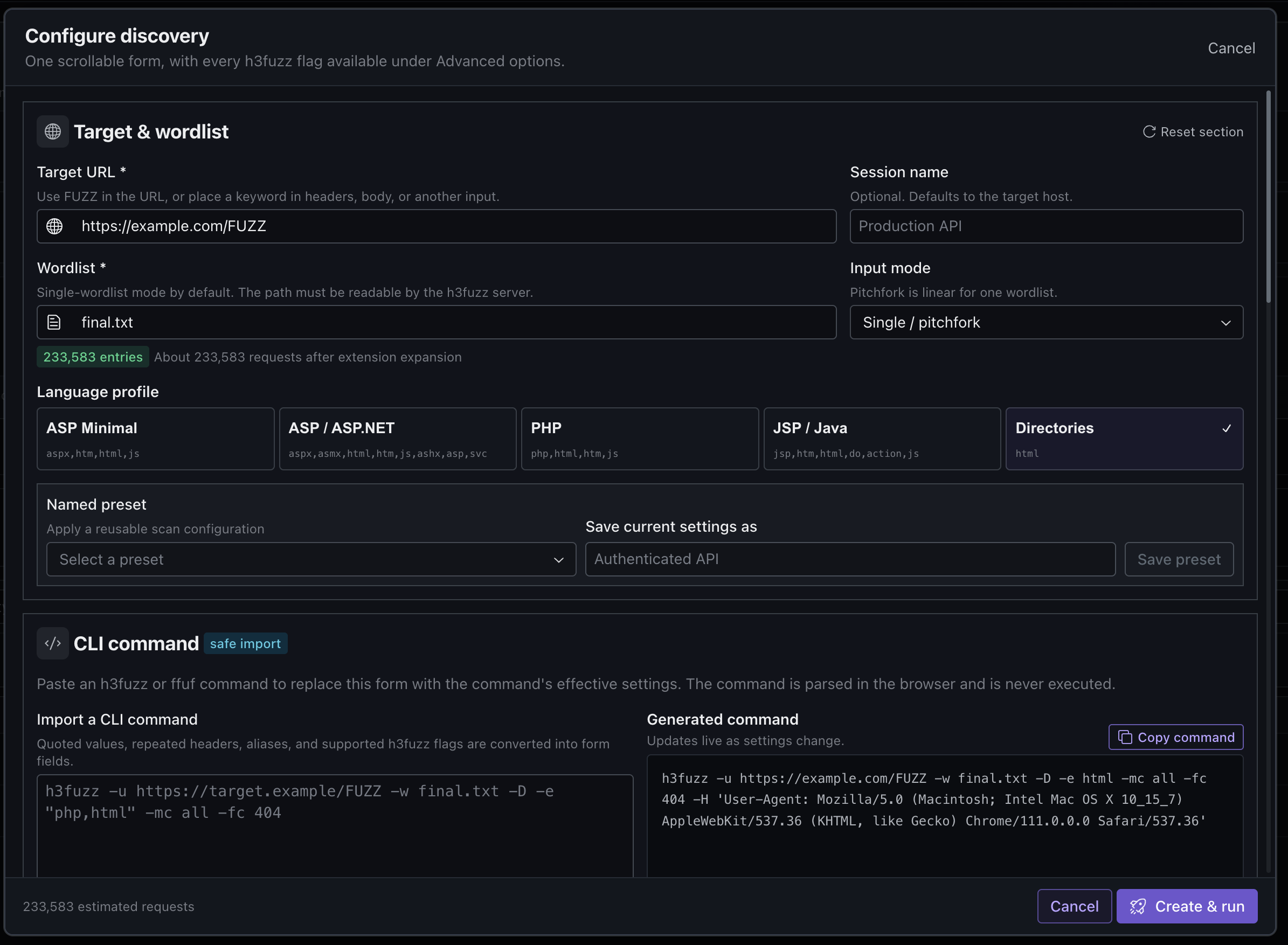
Usually when we are performing manual content discovery efforts, we often are plagued with responses that we want to readily filter out. We know that this is something you can do after starting a scan in ffuf's CLI version, but the previous results still take up most of the terminal. In our web UI, filtering bad responses works through intuitive filters and retroactively, to clean up your results pane.
Another common reality when fuzzing manually is that you want to perform several content discovery sessions at once. In CLI world, that means either using screen or tmux and switching between windows. This is often painful when managing a large number of sessions in the terminal, but is incredibly easy in a web UI. The web UI we built optimises for this use case.
Quickly going to, or exporting results, is also a pain when dealing with results from the terminal, but not from a web UI, which is another quality of life feature that I know people who do a lot of content discovery will really appreciate when using our tool.
Here's a short demo of h3fuzz (and its web UI):